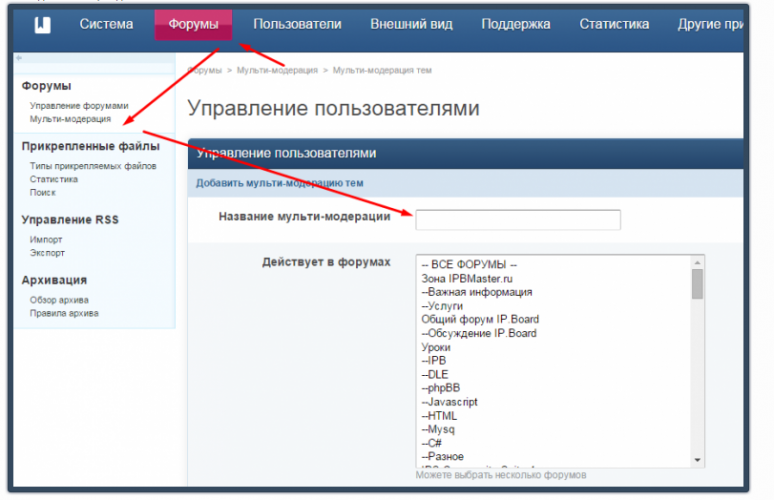

Весь контент Ciko
-
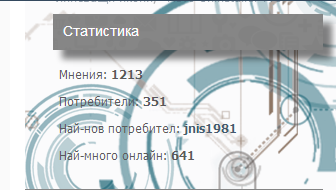
Админ Панель-Внешний вид-Ваш стиль-Список форумов-boardIndexTemplate найти: <foreach loop="side_blocks:$side_blocks as $block"> {$block} </foreach> Ниже добавить: <if test="showTotals:|:$this->settings['show_totals']"> <div class="ipsSideBlock clearfix __xXtwist352statistics"> <h3 id="anonymous_element_36"><a href="#" class="ipsSidebar_trigger ipsType_smaller right desc mod_links">×</a>Статистика</h3> <ul class="ipsList_data sb_statistics clearfix"> <li class="clearfix"> <span class="sl"> Всего сообщений:</span> <span class="sr"><b>{$stats['info']['total_posts']}</b></span> </li> <li class="clearfix"> <span class="sl">Пользователей:</span> <span class="sr"><b>{$stats['info']['mem_count']}</b></span> </li> <li class="clearfix"> <span class="sl">Новый участник:</span> <span class="sr"><b>{IPSMember::makeProfileLink( $stats['info']['last_mem_name'], $stats['info']['last_mem_id'], $stats['info']['last_mem_seo'], 'value' )}</b></span> </li> <li class="clearfix" data-tooltip='{$stats['info']['most_time']}' id="anonymous_element_37"> <span class="sl">Рекорд посещаемости:</span> <span class="sr"><b>{$stats['info']['most_online']}</b></span> </li> </ul> </div> </div> </if>
-
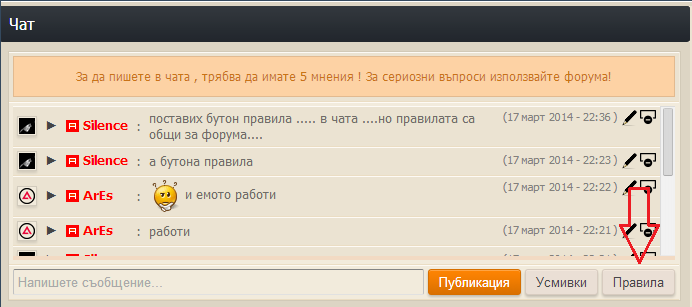
Админ Панель-Внешний вид-Ваш стиль-skin_shoutbox_hooks-hookGlobalShoutbox найти: <input type='button' id='shoutbox-myprefs-button' value='{$this->lang->words['my_prefs']}' class='input_submit alt' /> Под ним вставить: <input type='button' id='shoutbox-rules-button' value='Правила' class='right input_submit alt' /> Найти: <script type='text/javascript'>//<![CDATA[{$d['js']}//]]></script> Ниже добавить: <div id='shoutbox-rules' style='display: none; line-height: 1.5;'> <h3>{$this->lang->words['board_rules']}</h3> <div class='ipsBox'> <div class='ipsBox_container ipsPad'> <p>Добавить свои правела</p> </div> </div> </div> <script type='text/javascript'> $('shoutbox-rules-button').observe( 'click', function(e) { _var = new ipb.Popup( 'booboo', { type: 'pane', initial: $('shoutbox-rules').innerHTML, hideAtStart: false} ); Event.stop(e); return false; }); </script>
-
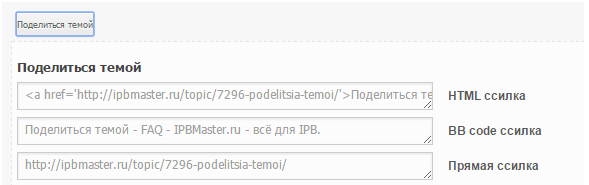
Админ Панель-Внешний вид-Ваш стиль-Темы-post найти: <ul id='postControlsNormal_{$post['post']['pid']}' class='post_controls clear clearfix' <if test="hideNormalControlsForUnapprovedPost:|:$this->memberData['is_mod'] && ! $topic['_isArchived'] && $post['post']['queued']">style='display:none'</if> Под ним вставить: <!--SBGS34 - Share this topic--> <if test="$post['post']['post_count'] == 1"> <div class="spoil"> <br /> <div class="smallfont"><input type="button" value="Поделиться темой" style="width: auto; !important" class="input-button bbc_spoiler_show" onclick="if (this.parentNode.parentNode.getElementsByTagName('div')[1].getElementsByTagName('div')[0].style.display != '') { this.parentNode.parentNode.getElementsByTagName('div')[1].getElementsByTagName('div')[0].style.display = ''; this.innerText = ''; this.value = 'Затвори'; } else { this.parentNode.parentNode.getElementsByTagName('div')[1].getElementsByTagName('div')[0].style.display = 'none'; this.innerText = ''; this.value = 'Поделиться темой';}"/></div> <div class="alt2"> <div class='bbc_spoiler_content' style="display:none;"> <h5 class="give-link-title">Поделиться темой</h5> <script>document.write("<div class='give-link'><textarea onclick='this.select()' ><a href='"+location.href+"'>"+document.title+"</a></textarea> HTML ссилка</div>");</script> <script>document.write("<div class='give-link'><textarea onclick='this.select()' >"+document.title+"</textarea> BB code ссилка</div>");</script> <script>document.write("<div class='give-link'><textarea onclick='this.select()' >"+location.href+"</textarea> Прямая ссилка</div>");</script> </div> </div> <br /> </div> </if> <!--SBGS34 - Share this topic--> Админ Панель-Внешний вид-Ваш стиль-CSS-ipb_styles.css добавить у самий ныз: /** * Share this topic */ .give-link-title { padding:12px 0 7px; color:#444; font-weight:bold; font-size: 13px; } .give-link { clear:left; font:bold 12px/28px Arial; } .give-link textarea { float:left; overflow:hidden; margin:0 15px 7px 0; padding:4px 7px; width:400px; height:18px; border:1px solid #ccc; white-space:nowrap; }
-
Админ Панель-Внешний вид-Ваш стиль-Список форумов-boardIndexTemplate вставте куда вам будет удобно: <div class="footer"> <link href="//maxcdn.bootstrapcdn.com/font-awesome/4.2.0/css/font-awesome.min.css" rel="stylesheet"> <div id="button"><i class="fa fa-share-alt"></i></div> <div id="containerbg"> <div id="contbg"> <div class="footer"> <h3><i class="fa fa-share-alt"></i> Поделитесь</h3></br> <div class="share42init"></div> <script type="text/javascript" src="http://сайта ви.com/share42/share42.js"></script> <div class='design'><a href="http://silencebgsoftware.com/index.php?/user/1-silence/" style="color: #fafafa;"><i class="fa fa-paint-brush"></i> </a></div> Админ Панель-Внешний вид-Ваш стиль-CSS-ipb_styles.css добавить у самий ныз: .footer #button{ width: 15px; font-size: 26px; border-radius: 35px; margin-left: 12px; position: relative; transition: all 1s ease; -webkit-animation: pulsate 1s ease-out; animation: pulsate 1s ease-out; -webkit-animation-iteration-count: infinite; animation-iteration-count: infinite; } .footer { text-align:center; bottom:0; left:0; position:fixed; width: 100%; height: 2em; overflow:hidden; margin:0 auto; -webkit-transition: all 1s ease; -moz-transition: all 1s ease; -o-transition: all 1s ease; -ms-transition: all 1s ease; transition: all 1s ease; z-index:999; } .footer:hover { -webkit-transition: all 1s ease; -moz-transition: all 1s ease; -o-transition: all 1s ease; -ms-transition: all 1s ease; transition: all 1s ease; height: 14em; } .footer #containerbg{ margin-top: 40px; width: 100%; height: 100%; color: #fafafa; position: relative; top: 0; left: 0; background: #283A4A; border-top: solid 1px #fafafa; } .footer #contbg{ position:relative; top:-45px; right:190px; width:150px; height:auto; margin:0 auto; } .footer h3{ margin-top: 70px; border-bottom: solid 1px #fafafa; text-shadow: rgba(0,0,0,0.85) 0px 1px 4px; font-weight: 300; font-size: 20px; line-height: 30px; font-family: 'Helveticaneue','Open Sans','Yanone Kaffeesatz',"Trebuchet MS",Arial,Helvetica,sans-serif; } .design{ font-size: 16px; line-height: 30px; } .design:hover{ background: #cd3816; } Распакуйте и загрузите папку share42 в корень вашего форума share42.zip

-
Админ Панель-Внешний вид-Ваш стиль-Список форумов-boardIndexTemplate найти: <li>{$forum_data['topics']} {$this->lang->words['topics']}</li> <li>{$forum_data['posts']} {$this->lang->words['replies']}</li> Заменить на: <div class="tag"><span class="tag-label">{$this->lang->words['topics']}</span> <span class="count"><span class="count-value">{$forum_data['topics']}</span></span></div> <div class="tag"><span class="tag-label">{$this->lang->words['replies']}</span> <span class="count"><span class="count-value">{$forum_data['posts']}</span></span></div> Админ Панель-Внешний вид-Ваш стиль-CSS-Добавить CSS-файл Название: tag .tag { overflow: hidden; margin: 0 10px 5px 0; } .tag-label { float: left; background: linear-gradient(#fff, #F0F0F0); border: 1px solid #D4D4D4; border-bottom-color: #A1A1A1; border-right-color: #A43E00; border-radius: 3px 0 0 3px; padding: 0 9px 0 7px; font: bold 12px/22px 'Helvetica Neue','Arial',sans-serif; color: #444; position: relative; } .tag-label:before { content: ''; width: 6px; height: 6px; border-left: 1px solid #A43E00; border-radius: 50%; background: #F25D00; position: absolute; right: -4px; top: 8px; z-index: 1; } .tag .count { float: left; margin-top: 1px; height: 20px; border-top: 1px solid #DC5400; border-bottom: 1px solid #DC5400; background: linear-gradient(#F46E00, #EC5400); overflow: hidden; box-shadow: inset 0 1px 0 #FD9D61; position: relative; max-width: 3px; transition: max-width 0.3s; } .tag:hover .count { max-width: 50px; } .tag .count:before { content: ''; position: absolute; top: 0; right: 0; width: 0; height: 100%; border-right: 1px solid #DC5400; } .tag .count:after { content: ''; position: absolute; top: 0; right: -3px; width: 4px; height: 4px; border-radius: 50%; /* Needs to be the background color */ background: #333; box-shadow: 0 6px 0 #333, 0 11px 0 #333, 0 16px 0 #333; } .tag .count-value { margin: 1px 4px 0 0; padding: 0 3px 0 5px; border-top: 1px dashed #D74A02; border-bottom: 1px dashed #F57A36; font: bold 12px/18px 'Helvetica Neue','Arial',sans-serif; color: #fff; height: 17px; position: relative; float: right; } .tag .count-value:before { content: ''; position: absolute; top: 0; left: 0; height: 0; width: 100%; border-top: 1px dashed #F87E31; } .tag .count-value:after { content: ''; position: absolute; bottom: 0; left: 0; height: 0; width: 100%; border-bottom: 1px dashed #D64901; }
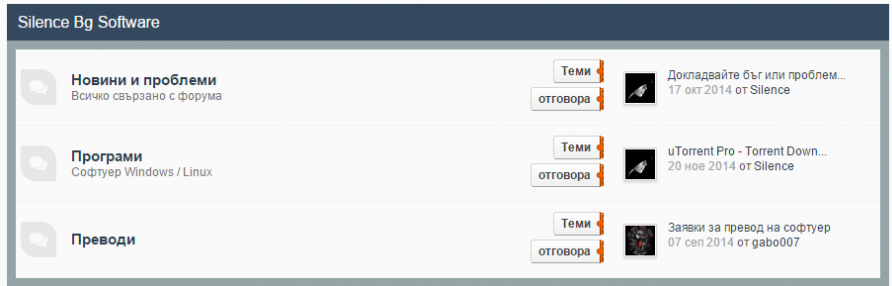
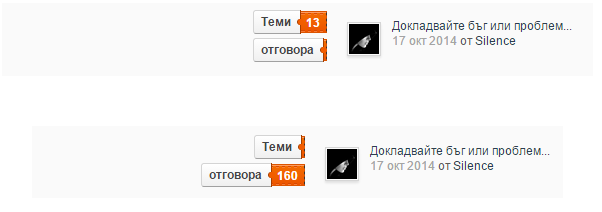
-
Админ Панель-Внешний вид-Ваш стиль-Глобальные-globalTemplate найти: <!-- ::: BRANDING STRIP: Logo and search box ::: --> <div id='branding'>После вставить: <div id="circle"></div>Админ Панель-Внешний вид-Ваш стиль-СSS-Добавить CSS-файл Название: circle #circle {position: absolute;top: 0; width: 50px; height: 50px; background: none; border-radius: 50%; box-shadow: rgba(255,255,255,0.1) 160px 335px,rgba(255,255,255,0.1) 120px 275px 0 12px,rgba(255,255,255,0.1) 60px 355px 0 23px,rgba(255,255,255,0.1) 230px 445px 0 -8px,rgba(255,255,255,0.1) 60px 125px,rgba(255,255,255,0.1) 260px 145px 0 12px,rgba(255,255,255,0.1) 300px 145px 0 23px,rgba(255,255,255,0.1) 100px 85px 0 -8px,rgba(255,255,255,0.1) 50px 155px,rgba(255,255,255,0.1) 150px 273px 0 -2px,rgba(255,255,255,0.1) 50px 555px 0 23px,rgba(255,255,255,0.1) 180px 5px 0 -8px; -webkit-animation: circle 30s linear infinite alternate; animation: circle 30s linear infinite alternate;}@-webkit-keyframes circle { 0%{ box-shadow: rgba(255,255,255,0.1) 160px 335px,rgba(255,255,255,0.1) 120px 275px 0 12px,rgba(255,255,255,0.1) 60px 355px 0 23px,rgba(255,255,255,0.1) 230px 445px 0 -8px,rgba(255,255,255,0.1) 60px 125px,rgba(255,255,255,0.1) 260px 145px 0 12px,rgba(255,255,255,0.1) 300px 145px 0 23px,rgba(255,255,255,0.1) 100px 85px 0 -8px,rgba(255,255,255,0.1) 350px 555px,rgba(255,255,255,0.1) 350px 273px 0 -2px,rgba(255,255,255,0.1) 150px 355px 0 23px,rgba(255,255,255,0.1) 180px 205px 0 -8px,rgba(255,255,255,0.1) 0px 0px 0 -8px,rgba(255,255,255,0.1) 100px 555px 0 10px; } 100%{ box-shadow: rgba(255,255,255,0.1) 70px 10px,rgba(255,255,255,0.1) 300px 205px 0 12px,rgba(255,255,255,0.1) 0px 155px 0 23px,rgba(255,255,255,0.1) 330px 45px 0 -8px,rgba(255,255,255,0.1) 460px 325px,rgba(255,255,255,0.1) 0px 445px 0 12px,rgba(255,255,255,0.1) 300px 145px 0 23px,rgba(255,255,255,0.1) 100px 85px 0 -8px,rgba(255,255,255,0.1) 50px 155px,rgba(255,255,255,0.1) 150px 273px 0 -2px,rgba(255,255,255,0.1) 0px 555px 0 23px,rgba(255,255,255,0.1) 180px 5px 0 -8px,rgba(255,255,255,0.1) 300px 555px 0 -8px,rgba(255,255,255,0.1) 350px 355px 0 10px; }}@keyframes circle { 0%{ box-shadow: rgba(255,255,255,0.1) 160px 335px,rgba(255,255,255,0.1) 120px 275px 0 12px,rgba(255,255,255,0.1) 60px 355px 0 23px,rgba(255,255,255,0.1) 230px 445px 0 -8px,rgba(255,255,255,0.1) 60px 125px,rgba(255,255,255,0.1) 260px 145px 0 12px,rgba(255,255,255,0.1) 300px 145px 0 23px,rgba(255,255,255,0.1) 100px 85px 0 -8px,rgba(255,255,255,0.1) 350px 555px,rgba(255,255,255,0.1) 350px 273px 0 -2px,rgba(255,255,255,0.1) 150px 355px 0 23px,rgba(255,255,255,0.1) 180px 205px 0 -8px,rgba(255,255,255,0.1) 0px 0px 0 -8px,rgba(255,255,255,0.1) 100px 555px 0 10px; } 100%{ box-shadow: rgba(255,255,255,0.1) 70px 10px,rgba(255,255,255,0.1) 300px 205px 0 12px,rgba(255,255,255,0.1) 0px 155px 0 23px,rgba(255,255,255,0.1) 330px 45px 0 -8px,rgba(255,255,255,0.1) 460px 325px,rgba(255,255,255,0.1) 0px 445px 0 12px,rgba(255,255,255,0.1) 300px 145px 0 23px,rgba(255,255,255,0.1) 100px 85px 0 -8px,rgba(255,255,255,0.1) 50px 155px,rgba(255,255,255,0.1) 150px 273px 0 -2px,rgba(255,255,255,0.1) 0px 555px 0 23px,rgba(255,255,255,0.1) 180px 5px 0 -8px,rgba(255,255,255,0.1) 300px 555px 0 -8px,rgba(255,255,255,0.1) 350px 355px 0 10px; }}
-
Статусы пользователей в профиле, комментариях и модальном окне пользователя (AJAX) 1. Выполнить запрос в базу данных: ALTER TABLE `dle_users` ADD `u_status` text not null 2. Скопировать файл status.php в engine/ajax. 3. Открыть файл /engine/modules/profile.php Найти: $xfieldsaction = "list"; Выше вставить: $status_text = "$row[u_status]"; if($status_text == "") $status_text ="Статус"; if($member_id['user_id'] == "1" or $member_id['user_id'] == "$row[user_id]"){ $user_status .= <<<HTML <script> <!-- $.fx.speeds._default = 1000; $(function() { $("#status_edit").dialog({ autoOpen: false, show: 'fade', width: '500', buttons: { "Отмена" : function() { $(this).dialog("close"); }, "Обновить" : function() { var message = $("#status_form").val(); var userid = "$row[user_id]"; ShowLoading(''); $.post(dle_root + "engine/ajax/status.php", { text:message, user:userid }, function(data){ $("#place").html(data); $("#status_form").val(''); HideLoading(''); }); $(this).dialog("close"); }, }, }); $( "#st_e_b" ).click(function() { $( "#status_edit" ).dialog( "open" ); return false; }); }); --> </script> HTML; } if($member_id['user_id'] == "1" or $member_id['user_id'] == "$row[user_id]" or $row['u_status'] != ""){ $user_status .= "<a href=\"#\" id=\"st_e_b\"><span id=\"place\">$status_text</span></a>"; } if($member_id['user_id'] == "1" or $member_id['user_id'] == "$row[user_id]"){ $user_status .= <<<HTML <div id="status_edit" title="Изменение статуса">О чем ты сейчас думаешь?<br /><br /><input type="text" name="status_e" id="status_form" /></div> HTML; } $tpl->set( '{user_status}', $user_status); 4. Открыть файл /engine/ajax/profile.php Найти: $tpl->compile( 'content' ); Выше вставить: $tpl->set( '{user_status}', $row['u_status'] ); 5. Откройте файлы: engine/ajax/addcomments.php engine/ajax/comments.php engine/modules/show.full.php engine/modules/lastcomments.php Найти: foto, fullname, Заменить: foto, fullname, u_status, 6. Открыть файл engine/classes/comments.class.php Найти: $tpl->set( '{group-name}', $user_group[$row['user_group']]['group_prefix'].$user_group[$row['user_group']]['group_name'].$user_group[$row['user_group']]['group_suffix'] ); После вставить: $tpl->set( '{user_status}', $row['u_status'] ); 7. В шаблонах userinfo.tpl, profile_popup.tpl, comments.tpl вставить {user_status} 8. В самый конец вашего css файла вставить: #status_form{border:solid 1px #2c76ad;height:23px;width:365px;padding:0 5px;border-radius:3px;box-shadow:inset 0 0 3px grey;-webkit-transition: all 0.5s;-moz-transition: all 0.5s;-ms-transition: all 0.5s;-o-transition: all 0.5s;transition: all 0.5s;} #status_form:focus{box-shadow:inset 0 0 6px grey;}
-
Музыку при заходе на сайт.Добавить куда вам будет удобно. <object data="http://flash-mp3-player.net/medias/player_mp3_mini.swf" width="0" height="0"><param name="FlashVars" value="mp3=ссылканамузыку.mp3&autoplay=1&bgcolor=000000&loadingcolor=000000&buttoncolor=000000&slidercolor=000000"></object>
-
<center><b><font color="07EB06">Игроки online: <script type="text/javascript" src="http://monitoring.sangta.ru/api.php?ip=IP&port=7777"></script> <script type="text/javascript">document.write(samp.players);</script> <script type="text/javascript" src="http://monitoring.sangta.ru/api.php?ip=IP&port=7777"></script> <script type="text/javascript">document.write(samp.maxplayers);</script> </font></b></center> Где /api.php?ip=IP&port=7777 Порт и IP меняете на свои
-
Админ Панель-Внешний вид-Ваш стиль-Глобалыние-globalTemplate найти: <if test="hasCustomPrimaryNavigation:|:!empty($header_items['primary_navigation_menu'])"> {$header_items['primary_navigation_menu']} <else /> <if test="applicationsloop:|:is_array($header_items['applications']) AND count($header_items['applications'])"> <foreach loop="applications:$header_items['applications'] as $data"> <if test="showingapp:|:$data['app_show']"> {parse variable="appActive" default="" oncondition="$data['app_active']" value="active"} <li id='nav_app_{$data['app_dir']}' class="left {parse variable="appActive"}"><a href='{parse url="{$data['app_link']}" seotitle="{$data['app_seotitle']}" template="{$data['app_template']}" base="{$data['app_base']}"}' title='{parse expression="sprintf( $this->lang->words['go_to_prefix'], IPSLib::getAppTitle($data['app_dir']) )"}'>{IPSLib::getAppTitle($data['app_dir'])}</a></li> </if> </foreach> </if> </if> Ниже добавить: <div id="css-menu"> <ul> <li><a href="http://ipb-board.com/"> <span class="text-top">Форум</span> <span class="text-bottom">ipb-board.com</span> </a></li> <li><a href="http://ipb-board.com/"> <span class="text-top">ipb-board.com</span> <span class="text-bottom">ipb-board.com</span> </a></li> <li><a href="http://ipb-board.com/"> <span class="text-top">ipb-board.com</span> <span class="text-bottom">ipb-board.com</span> </a></li> <li><a href="http://ipb-board.com/"> <span class="text-top">ipb-board.com</span> <span class="text-bottom">ipb-board.com</span> </a></li> </ul> </div>
-
Админ Панель-Внешний вид-Ваш стиль-Список форумов-boardIndexTemplate найти: <!-- CATS AND FORUMS --> После вставить: <php>$groups = array(1, 2);</php><if test="in_array($this->memberData['member_group_id'], $groups)"> <style type="text/css"> #category_41.category_block{ position: relative; } #category_41:after{ content: ""; border-radius: 5px; background: rgba(255, 255, 255, 0.66) url(http://ipbmaster.ru/public/style_images/by ipbmaster/regggga.png) no-repeat; background-position: 50% 65%;background-size: contain; position: absolute; top: 0; left: 0; right: 0; bottom: 0; border: 1px solid #C7C6C0; z-index: 9999; margin: 0 0 10px 0; cursor: normal; } </style></if> Где $groups = array(1, 2) меняем на те группы каким хотите закрыть доступ.
-
1. Перейти Admin CP -> Look & Feel -> Select Template -> Board Index > boardIndexTemplate и найти: <foreach loop="side_blocks:$side_blocks as $block"> {$block} </foreach> 2. Перед ним поместить этот код: <div class='ipsSideBlock clearfix '> <div class='_sbcollapsable'> <div class="grid"> <figure class="effect-sadie"> <img src="http://zombr.org/portal_assets/img/side_qn_download.png" alt="download cs by zombr"> <figcaption> <h2><span>Скачать CS 1.6</span></h2> <p>Скачать сейчас!</p> <a href="http://zombr.org/_counter_strike_1_6.html"></a> </figcaption> </figure> <figure class="effect-sadie"> <img src="http://zombr.org/portal_assets/img/side_qn_unban.png" alt="unban request"> <figcaption> <h2>Вас <span>забанили</span>?</h2> <p>Подайте заявку на разбан!</p> <a href="http://zombr.org/banlist/"></a> </figcaption> </figure> <figure class="effect-sadie"> <img src="http://zombr.org/portal_assets/img/side_qn_watchers.png" alt="watcher"> <figcaption> <h2>Как стать смотрителем?</h2> <p>Подать заявку прямо сейчас!</p> <a href="http://zombr.org/forum/6/"></a> </figcaption> </figure> </div> </div></div> 3. Сохранить. 4. Перейти Admin -> CPLook & Feel -> Manage Skin Sets & Templates -> Manage Templates in -> Select Template -> и нажмите кнопку Добавить CSS-файла. 5. Назовите его grid 6. Поместите следующий код в нем: .grid { overflow: hidden; margin: 0; width: 100%; max-width: 1920px; list-style: none; text-align: center; } figure.effect-sadie { -webkit-transition: background 0.35s, -webkit-transform 0.35s; transition: background 0.35s, transform 0.35s; } .grid figure { position: relative; z-index: 1; display: inline-block; overflow: hidden; margin: 0 -0.135em 0.600em -0.135em; background: #3047A3; text-align: center; cursor: pointer; } figure.effect-sadie img { -webkit-transition: opacity 0.35s, -webkit-transform 0.35s; transition: opacity 0.35s, transform 0.35s; } .grid figure img { position: relative; display: block; min-height: 100%; opacity: 0.8; } .grid figure figcaption, .grid figure a { position: absolute; top: 0; left: 0; width: 100%; height: 100%; } .grid figure figcaption { color: #fff; text-transform: uppercase; font-size: 1.25em; -webkit-backface-visibility: hidden; backface-visibility: hidden; } .grid figure a { z-index: 1000; text-indent: 200%; white-space: nowrap; font-size: 0; opacity: 0; } figure a { position: absolute; top: 0; left: 0; width: 100%; height: 100%; } figure.effect-sadie:hover figcaption::before, figure.effect-sadie:hover p { opacity: 1; -webkit-transform: translate3d(0,0,0); transform: translate3d(0,0,0); } figure.effect-sadie p { position: absolute; bottom: 0; left: 0; padding: 0 0 6px 0; width: 100%; opacity: 0; -webkit-transform: translate3d(0,10px,0); transform: translate3d(0,10px,0); } figure.effect-sadie figcaption::before, figure.effect-sadie p { -webkit-transition: opacity 0.35s, -webkit-transform 0.35s; transition: opacity 0.35s, transform 0.35s; } figure.effect-sadie:hover h2 { color: #fff; -webkit-transform: translate3d(0,-70%,0) translate3d(0,-70px,0); transform: translate3d(0,-70%,0) translate3d(0,-70px,0); } figure.effect-sadie h2 { position: absolute; top: 82%; left: 0; width: 100%; color: #fff; -webkit-transition: -webkit-transform 0.35s, color 0.35s; transition: transform 0.35s, color 0.35s; -webkit-transform: translate3d(0,-50%,0); transform: translate3d(0,-50%,0); text-shadow: 1px 1px 0px rgba(0,0,0,.2); } .grid figure h2, .grid figure p { margin: 0; } .grid figure h2 { font-weight: 300; } h1, h2, h3, h4, h5, h6 { font-size: 100%; font-weight: normal; } figure.effect-sadie figcaption::before, figure.effect-sadie p { -webkit-transition: opacity 0.35s, -webkit-transform 0.35s; transition: opacity 0.35s, transform 0.35s; } figure.effect-sadie:hover figcaption::before, figure.effect-sadie:hover p { opacity: 1; -webkit-transform: translate3d(0,0,0); transform: translate3d(0,0,0); } figure.effect-sadie figcaption::before { position: absolute; top: 0; left: 0; width: 100%; height: 100%; background: -webkit-linear-gradient(top, rgba(72,76,97,0) 0%, rgba(72,76,97,0.8) 75%); background: linear-gradient(to bottom, rgba(72,76,97,0) 0%, rgba(72,76,97,0.8) 75%); content: ''; opacity: 0; -webkit-transform: translate3d(0,50%,0); transform: translate3d(0,50%,0); }
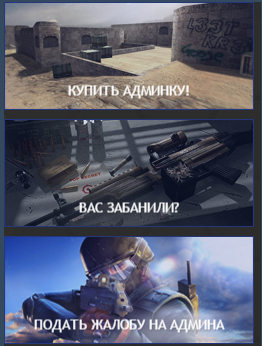
-
Админ Панель-Внешний вид-Ваш стиль-skin_shoutbox_hooks-hookGlobalShoutbox найти: <if test="$this->settings['shoutbox_allow_smilies']"> <input type='button' id='shoutbox-smilies-button' value='{$this->lang->words['smilies']}' class='input_submit alt' data-clicklaunch="populateSmilies" data-scope="shoutbox" /></if> Заменить на: <if test="$this->settings['shoutbox_allow_smilies']"> <li type='button' id='shoutbox-smilies-button' data-clicklaunch="populateSmilies" data-scope="shoutbox" class="cool"> Смайлики <span><i></i></span></li></if> Админ Панель-Внешний вид-Ваш стиль Добавить CSS-файла. Назовите его cool Поместить весь код: .cool { position: relative; color: #FFF; background: #314153; font-size: 14px; font-family: Avenir,"Avenir Pro",Helvetica,Arial,sans-serif; padding: 0 5px 0 30px; line-height: 24px; border-radius: 3px; display: inline-block; cursor: pointer; } .cool span { display: inline-block; position: absolute; width: 25px; height: 25px; left: 0; top: 0; } .cool span:before, .cool span:after { content: ""; position: absolute; width: 4px; height: 4px; top: 7px; border-radius: 50%; display: block; background: #fff; -webkit-transition: all 300ms cubic-bezier(0.5, 1, 0.8, 1.6); transition: all 300ms cubic-bezier(0.5, 1, 0.8, 1.6); } .cool span:before { left: 25%; } .cool span:after { right: 25%; } .cool span i { display: block; position: absolute; width: 13px; height: 8px; top: 9px; border-bottom: 2px solid #fff; border-radius: 130%; left: 50%; ; } .cool:hover span:after, .cool:hover span:before { background: #fff; top: 10px; } .cool:hover span:before { left: 60%; ; width: 15px; height: 2px; border-radius: 2px; margin-top: 1px; -webkit-transform: rotate(135deg); -ms-transform: rotate(135deg); transform: rotate(135deg); } .cool:hover span i { opacity: 0; } .cool:hover span:after { right: 60%; margin-right: -10px; width: 15px; height: 2px; border-radius: 2px; margin-top: 1px; -webkit-transform: rotate(-135deg); -ms-transform: rotate(-135deg); transform: rotate(-135deg); }

-
Админ Панель-Внешний вид-Ваш стиль-Добавить CSS-файл название: Silence_BBcodes. Вставить все туда: h7{ font-weight: 100; font-size: 20pt; line-height: 1.3em; margin: 15px 0; } div.messagebg { position: relative; padding: 10px; padding-left: 35px; margin: 30px 10px; box-shadow:0 2px 5px rgba(0,0,0,.3); background: #BBB; color: #FFF; -webkit-transition: all .5s ease; -moz-transition: all .5s ease; -ms-transition: all .5s ease; -o-transition: all .5s ease; transition: all .5s ease; } div.messagebg:hover{ box-shadow: 0 15px 20px rgba(10,0,10,.3); -webkit-filter: brightness(110%); } div.messagebg:before{ content: ''; font-family: FontAwesome; position: absolute; display: block; top: -21px; left: 50%; margin:0 -21px; font-size: 20px; line-height: 24px; text-align: center; width: 24px; padding:10px; background: inherit; box-shadow:0 5px 10px rgba(0,0,0,.25); color: rgba(255,255,255,.75); border-radius:50%; border: 2px solid transparent; z-index: 2; } div.messagebg.information:before{content:'\f129';} div.messagebg.announcement:before{content:'\f0f3';} div.messagebg.success:before{content:'\f00c';} div.messagebg.warning:before{content:'\f12a';} div.messagebg.error:before{content:'\f00d';} div.messagebg.information{background: #39B;} div.messagebg.warning{background: #E74;} div.messagebg.success{background: #5A6;} div.messagebg.announcement{background: #EA0;} div.messagebg.error{background: #C43;} Админ Панель-Внешний вид-Ваш стиль-Глобалыние-globalTemplate и найти: <!DOCTYPE html> После вставить: <link href="http://ваш форум/public/style_images/ваш скин/font-awesome.css" rel="stylesheet"> загрузить этот css в /public/style_images/ваш скин: font-awesome.css Админ Панель-Внешний вид-Сообщения-BB-коды установить ВВ-коды (Silence) BBCodes v2.zip
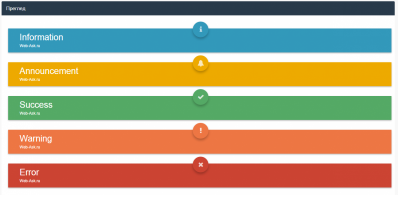
-
Админ Панель-Внешний вид-Ваш стиль-Список форумов-boardIndexTemplate добавить куда вам будет удобно: <div class="legendas"> <div class="admin" onclick="window.location.href='index.php?app=members&section=view&module=list&showall=0&sort_key=members_l_display_name&sort_order=asc&max_results=20&app=members&section=view&module=list&name_box=begins&filter=4'" onmouseover="document.getElementById('admin').style.display='block'" onmouseout="document.getElementById('admin').style.display='none'"></div> <div class="moderador" onclick="window.location.href='index.php?app=members&section=view&module=list&showall=0&sort_key=members_l_display_name&sort_order=asc&max_results=20&app=members&section=view&module=list&name_box=begins&filter=6'" onmouseover="document.getElementById('moderador').style.display='block'" onmouseout="document.getElementById('moderador').style.display='none'"></div> <div class="Helpers" onclick="window.location.href='index.php?app=members§ion=view&module=list&showall=0&sort_key=members_l_display_name&sort_order=asc&max_results=20&app=members§ion=view&module=list&name_box=begins&filter=8'" onmouseover="document.getElementById('Helpers').style.display='block'" onmouseout="document.getElementById('Helpers').style.display='none'"></div> <div class="leaders" onclick="window.location.href='index.php?app=members&section=view&module=list&showall=0&sort_key=members_l_display_name&sort_order=asc&max_results=20&app=members&section=view&module=list&name_box=begins&filter=7'" onmouseover="document.getElementById('leaders').style.display='block'" onmouseout="document.getElementById('leaders').style.display='none'"></div> <div class="member" onclick="window.location.href='index.php?app=members&section=view&module=list&showall=0&sort_key=members_l_display_name&sort_order=asc&max_results=20&app=members&section=view&module=list&name_box=begins&filter=3'" onmouseover="document.getElementById('member').style.display='block'" onmouseout="document.getElementById('member').style.display='none'"></div> <div class="ban" onmouseover="document.getElementById('ban').style.display='block'" onmouseout="document.getElementById('ban').style.display='none'"></div> <div class="legenda"><div class="legenda1"> <div id="admin" style="display: none; color:#FF1515;">Администратор</div> <div id="moderador" style="display: none; color:#1F9A04;">Модераторы сервера</div> <div id="Helpers" style="display: none; color:#7700c2;">Helpers Team</div> <div id="leaders" style="display: none; color:#0780CF;">Лидеры сервера</div> <div id="member" style="display: none; color: #34E4F9;">Игроки</div> <div id="ban" style="display: none; color:#000; text-decoration: line-through;">Заблокированный</div></div></div></div> Админ Панель-Внешний вид-Ваш стиль-css-ipb_styles.css добавить у самый низ: /*************************************************************/ /* GRUPS */ .legendas { float: left; padding-top: 2px; background: #F3F3F3; border-radius: 3px; border: 1px solid #DFDFDF; height: 18px; padding-left: 2px; padding-right: 2px; width: 250px; margin-top: 5px; margin-bottom: 3px; } .legenda1 { font-size: 12px; font-weight: bold; padding: 0px 0px 5px 2px; } .admin {text-align:center; background-color:#FF1515; width:13px; float:left; height: 13px; margin:2px; font-size:11px; cursor:pointer;} .moderador {text-align:center; background-color:#1F9A04; width:13px; float:left; height: 13px; margin:2px; font-size:11px; cursor:pointer;} .Helpers {text-align:center; background-color:#7700c2; width:13px; float:left; height: 13px; margin:2px; font-size:11px; cursor:pointer;} .leaders {text-align:center; background-color:#0780CF; width:13px; float:left; height: 13px; margin:2px; font-size:11px; cursor:pointer;} .member {text-align:center; background-color:#34E4F9; width:13px; float:left; height: 13px; margin:2px; font-size:11px; cursor:pointer;} .ban {text-align:center; background-color:#000; width:13px; float:left; height: 13px; margin:2px; font-size:11px; cursor:pointer;} А что добавить другие группи Админ Панель-Внешний вид-Ваш стиль-Список форумов-boardIndexTemplate <div class="legendas"> Добавить после: <div class="Название группы" onclick="window.location.href='index.php?app=members&section=view&module=list&showall=0&sort_key=members_l_display_name&sort_order=asc&max_results=20&app=members&section=view&module=list&name_box=begins&filter=Тут ID группы'" onmouseover="document.getElementById('Название группы').style.display='block'" onmouseout="document.getElementById('Название группы').style.display='none'"></div> Админ Панель-Внешний вид-Ваш стиль-css-ipb_styles.css добавыть у самый ныз: .Название группы {text-align:center; background-color:#FF1515; width:13px; float:left; height: 13px; margin:2px; font-size:11px; cursor:pointer;}
-
Админ Панель-Внешний вид-Ваш стиль-Глобальные-globalTemplate найти: </html> После вставить: <if test="($this->settings['guestMessage']=='yes') AND !($this->memberData['member_id'])"> <div style="right: -5px; bottom: -5px; width: 281px;" class=" mystickymsg"> <p> <a class="bbc_url" href="{parse url="app=core&module=global&section=register" base="public"}"><img alt="Регистрация" class="bbc_img" src="http://ссилка на ваш форум/public/style_images/reg.png"></a> </p> </div></if> Админ Панель-Внешний вид-Ваш стиль-css-ipb_styles.css добавыть у самый ныз: .mystickymsg{position:fixed;z-index:9990;color:fff;height:auto;opacity:1} .mystickymsg:hover{opacity: .9} Загрузить картинки и заменить ссилки Screenshot_1.zip
-
Админ Панель-Внешний вид-Ваш стиль-css-ipb_style.css добавить у самый низ: ::-webkit-scrollbar{background:transparent} ::-webkit-scrollbar{width:9px;height:8px} ::-webkit-scrollbar-thumb{background:#55728b} ::-moz-scrollbar{background:transparent} ::-moz-scrollbar{width:9px;height:8px} ::-moz-scrollbar-thumb{background:#34495e} ::-o-scrollbar{background:transparent} ::-o-scrollbar{width:9px;height:8px} ::-o-scrollbar-thumb{background:#55728b}
-
Как на Zombr Админ Панель-Внешний вид-Ваш стиль-Создать CSS-Назавание: zm-footer и вставить все туда: /* Footer -------------------------------------------------------------------------------*/ #zm-footer { color: #808080; font-family: tahoma, sans-serif; font-size: 11px; margin: 20px 0 0 0; } #zm-footer .first-level { background: #fff; border-top: 3px solid #e9e9e9; padding: 12px 29px; overflow: hidden; } #zm-footer .first-level .site-description { width: 278px; margin: 0 20px 0 0; float: left; } #zm-footer .first-level .site-description > img { margin: 8px 0 6px 0; } #zm-footer .first-level .primary-links { margin: 10px 0 0 0; width: 160px; float: left; } #zm-footer .first-level .primary-links > strong { font-size: 14px; font-weight: normal; display: block; color: #686868; margin: 0 0 16px 0; } #zm-footer .first-level .primary-links > a { display: block; color: #808080; margin: 8px 0; text-decoration: none; } #zm-footer .first-level .primary-links > a:hover { display: block; color: #686868; margin: 3px 0; } #zm-footer .first-level .last-news { margin: 10px 25px 0 0; width: 240px; float: left; } #zm-footer .first-level .last-news > strong { font-size: 14px; font-weight: normal; display: block; color: #686868; margin: 0 0 10px 0; } #zm-footer .first-level .last-news > a { display: block; color: #808080; padding: 6px 0; text-decoration: none; } #zm-footer .first-level .last-news > a:hover { color: #686868; } #zm-footer .first-level .other { margin: 10px 0 0 0; width: 276px; float: left; } #zm-footer .first-level .other > strong { font-size: 14px; font-weight: normal; display: block; color: #686868; margin: 0 0 8px 0; } #zm-footer .first-level .other > .feedback { padding: 4px; line-height: 16px; } #zm-footer .first-level .other .feedback_row { padding: 0 0 6px; } #zm-footer .first-level .other .feedback_row__icon { float: left; } #zm-footer .first-level .other .feedback_row__type { margin: 0 0 0 40px; } #zm-footer .first-level .other .feedback_row__type .desc { font-size: 11px; } #zm-footer .second-level { background: #fff; height: 53px; line-height: 53px; padding: 0 12px; } #zm-footer .second-level .banners { overflow: hidden; margin: 0; } #zm-footer .second-level .banners > .banner { float: left; margin: 0 6px 0 0; } #zm-footer .second-level .banners > .banner:last-child { margin: 0; } #zm-footer .second-level .ipbmenu_content { line-height: 18px; } #zm-footer .second-level .secondary { padding: 2px 0 0 0; } #zm-footer .second-level .secondary a { padding: 0 10px 0 0; } #zm-footer .second-level .studio-copy { margin: 0 0 0 0; height: 32px; } #zm-footer .second-level a { color: #808080; text-decoration: none; -webkit-transition: all 0.5s ease; -moz-transition: all 0.5s ease; -ms-transition: all 0.5s ease; -o-transition: all 0.5s ease; transition: all 0.5s ease; } #zm-footer .second-level a:hover { color: #cc0000; -webkit-transition: all 0.5s ease; -moz-transition: all 0.5s ease; -ms-transition: all 0.5s ease; -o-transition: all 0.5s ease; transition: all 0.5s ease; } Админ Панель-Внешний вид-Ваш стиль-Глобальные-globalTemplate найти: <!-- ::: FOOTER (Change skin, language, mark as read, etc) ::: --> <div id='footer_utilities' class='clearfix clear'> Добавить после: <footer id="zm-footer"> <div class="first-level"> <div class="main_width"> <div class="site-description"> <img src="http://zombr.org/public/style_images/bulletin/footer_logo.png" alt=""> <div>ZOMBR.ORG © 2010 - 2015</div> </div> <div class="primary-links"> <strong>Основные ссылки</strong> <a href="http://zombr.org">Главная страница</a> <a href="http://zombr.org/forums">Сообщество</a> <a href="http://zombr.org/shop/">Магазин</a> <a href="http://zombr.org/banlist/">Бан-листы</a> <a href="http://zombr.org/sitemap.xml">Карта сайта</a> </div> <div class="last-news"> <strong>Последние новости</strong> <a href="http://zombr.org/news/53/">Стартуем! Обновления "Зомби Серверов" - 0.1</a><a href="http://zombr.org/news/52/">Обновления которых все ждут.</a><a href="http://zombr.org/news/51/">Опять проблемы с БД...</a><a href="http://zombr.org/news/50/">Базы данных восстановлены.</a><a href="http://zombr.org/news/49/">Слетели базы данных на серверах.</a><a href="http://zombr.org/news/48/">SURF сервер полноценно работает! </a> </div> <div class="other"> <strong>Связаться с Администрацией</strong> <div class="feedback"> <div class="feedback_row"> <div class="feedback_row__icon"><img src="http://zombr.org/public/style_images/bulletin/feedback_ico/skype_circle_color-32.png" alt=""></div> <div class="feedback_row__type"> <strong>zombr4elovek</strong> <div class="desc">Свяжитесь с администратором через Skype</div> </div> </div> <div class="feedback_row"> <div class="feedback_row__icon"><img src="http://zombr.org/public/style_images/bulletin/feedback_ico/icq.png" alt=""></div> <div class="feedback_row__type"> <strong>628-165-318</strong> <div class="desc">Свяжитесь с администратором через ICQ</div> </div> </div> <div class="feedback_row"> <div class="feedback_row__icon"><img src="http://zombr.org/public/style_images/bulletin/feedback_ico/vkontakte-30.png" alt=""></div> <div class="feedback_row__type"> <strong>http://vk.com/kirille</strong> <div class="desc">Свяжитесь с администратором ВКонтакте</div> </div> </div> <div class="feedback_row"> <div class="feedback_row__icon"><img src="http://zombr.org/public/style_images/bulletin/feedback_ico/basic1-036_phone_call-32.png" alt=""></div> <div class="feedback_row__type"> <strong>38 063 74 6 74 (восемь) (два)</strong> <div class="desc">Свяжитесь с администратором по телефону</div> </div> </div> </div> </div> </div> </div> <div class="secondary"> <a rel="nofollow" href="#" id="new_language">Русский (RU)</a> <ul id="new_language_menucontent" class="ipbmenu_content with_checks" style="display: none; position: absolute; z-index: 9999;"> <li class="selected" style="z-index: 10000;"> <a href="http://zombr.org/index.php?&k=76f26d90983ba52d2dc891bc12a12273&setlanguage=1&langurlbits=&cal_id=&langid=1" style="z-index: 10000;">Русский (RU)</a> </li> <li style="z-index: 10000;"> <a href="http://zombr.org/index.php?&k=76f26d90983ba52d2dc891bc12a12273&setlanguage=1&langurlbits=&cal_id=&langid=2" style="z-index: 10000;">Русский (RU) (COPY)</a> </li> </ul> <a href="http://zombr.org/sitemap.xml">Карта сайта</a> </div> </div> </div> </footer>
-
Админ Панель-Внешний вид-Ваш стиль-Список форумов-boardIndexTemplate найти: <td class='col_c_stats ipsType_small'> <ul> <li><strong>{$forum_data['topics']}</strong> {$this->lang->words['topics']}</li> <li><strong>{$forum_data['posts']}</strong> {$this->lang->words['replies']}</li> </ul> </td> Заменить на: <td class='forumThreadTd'> <div class="forumotv south" data-tooltip="Кол-во ответов" >{$forum_data['posts']}</div> <div class="forumtem south" data-tooltip="Кол-во тем" >{$forum_data['topics']}</div> </td> Админ Панель-Внешний вид-Ваш стиль-css-ipb_styles.css добавить код у самый низ: .forumotv { background: url(http://soc-life.com/makeup/otv.png) no-repeat; width: 44px; height: 44px; float: right; color: #d2d2d2; text-align: center; line-height: 40px; cursor: pointer; margin: 0 10px 0 15px; } .forumotv:hover { background: url(http://soc-life.com/makeup/otvh.png) no-repeat; color: #1ca800; } .forumtem { background: url(http://soc-life.com/makeup/tem.png) no-repeat; width: 44px; height: 44px; float: right; text-align: center; color: #d2d2d2; line-height: 40px; cursor: pointer; } .forumtem:hover { background: url(http://soc-life.com/makeup/temh.png) no-repeat; color: #1ca800; } Заменить на свои ссилку и загрузить картинки otv.zip
-
Скачиваем архив и распаковываем, загружаем smooth.js в корень своего форума. В globalTemplate После: <head>Ставим: <script type='text/javascript' src="//ваш_адрес/smooth.js"></script>smooth.zip
-
Админ Панель-Внешний вид-Ваш стиль-Глобальные-globalTemplate ищем: <head> После добавить: <!--[if lt IE 9]> <script src="http://html5shim.googlecode.com/svn/trunk/html5.js"></script> <![endif]--><!--[if lt IE 9]> <script src="http://html5shim.googlecode.com/svn/trunk/html5.js"></script><![endif]--> Админ Панель-Внешний вид-Ваш стиль-Глобальные-globalTemplate добавить куда вам будет хорошо: <div class="contact"> <form action="#"> <fieldset> <div class="row"> <section class="col col-2"> <label class="input"> <i class="fa fa-append fa-user"></i> <input type="text" placeholder="Имя" required> </label> </section> <section class="col col-2"> <label class="input"> <i class="fa fa-append fa-envelope-o"></i> <input type="email" placeholder="E-mail" required> </label> </section> </div> <section> <label class="input"> <i class="fa fa-append fa-tag"></i> <input type="text" placeholder="Тема"> </label> </section> <section> <label class="textarea"> <i class="fa fa-append fa-comment"></i> <textarea rows="4" placeholder="Сообщение" required></textarea> </label> </section> <button type="submit" class="button">Отправить</button> </fieldset> </form> </div> Админ Панель-Внешний вид-Ваш стиль-css-ipb_styles.css добавить у самый или как вам будет удобно взять и создать свой css-файл .contact { max-width: 467px; min-width: 320px; margin: 0 auto; background: rgba(255,255,255,0.9); box-shadow: 0 0 8px rgba(0,0,0,.3); } .contact * { outline: none; border: 0; background: none; } form fieldset { display: block; padding: 25px 30px; } form .row { margin: 0 -15px; } form .col-2 { width: 50%; } form .col { float: left; min-height: 1px; padding-right: 15px; padding-left: 15px; box-sizing: border-box; -moz-box-sizing: border-box; } form .row:after { content: ''; display: table; clear: both; } form section { margin-bottom: 20px; } form .input, form .textarea, form .radio, form .checkbox, form .button { position: relative; display: block; } form .fa-append { position: absolute; top: 5px; right: 5px; width: 29px; height: 29px; padding-left: 3px; border-left: 1px solid #e5e5e5; font-size: 15px; line-height: 29px; text-align: center; color: #ccc; } .fa { display: inline-block; font-family: FontAwesome; font-style: normal; font-weight: normal; line-height: 1; -webkit-font-smoothing: antialiased; -moz-osx-font-smoothing: grayscale; } .fa-user:before { content: "\f007"; } .fa-envelope-o:before { content: "\f003"; } .fa-tag:before { content: "\f02b"; } .fa-comment:before { content: "\f075"; } form .input .fa-append + input, form .textarea .fa-append + textarea { padding-right: 46px; } form .input input, form .textarea textarea { display: block; box-sizing: border-box; -moz-box-sizing: border-box; width: 100%; height: 39px; padding: 8px 10px; outline: none; border: 2px solid #e5e5e5; border-radius: 0; background: #fff; font: 13px/19px 'Open Sans', Helvetica, Arial, sans-serif; color: #404040; appearance: normal; -moz-appearance: none; -webkit-appearance: none; transition: border-color 0.3s; -o-transition: border-color 0.3s; -ms-transition: border-color 0.3s; -moz-transition: border-color 0.3s; -webkit-transition: border-color 0.3s; } form .textarea textarea { height: auto; resize: none; overflow:auto; } form .input:hover input, form .textarea:hover textarea, form .checkbox:hover i { border-color: #00BDAB; } form .input input:focus, form .textarea textarea:focus, form .checkbox input:focus + i { border-color: #009688; } form .button { float: right; height: 39px; overflow: hidden; margin-left: 20px; padding: 0 20px; outline: none; border: 0; background-color: #009688; font: 300 13px/39px 'Open Sans', Helvetica, Arial, sans-serif; text-decoration: none; color: #fff; cursor: pointer; opacity: 0.8; transition: opacity 0.2s; -o-transition: opacity 0.2s; -ms-transition: opacity 0.2s; -moz-transition: opacity 0.2s; -webkit-transition: opacity 0.2s; } form .button:hover { opacity: 1; } @media screen and (max-width: 470px){ .col, .col-2 { float: none !important; width: 100% !important;} }
-
Админ Панель-Внешний вид-Ваш стиль-Глобальные-globalTemplate удалить: <if test="canSearch:|:$this->memberData['g_use_search'] && $this->settings['allow_search']"> {parse template="quickSearch" group="global" params=""} </if>
-
Админ Панель-Внешний вид-Ваш стиль-css-ipb_styles.css добавить у самый низ: .resized_img {margin: 0 5px 5px 0;display: inline-block;background: #34495E;border: #2C3E50 1px solid;border-radius: 3px;padding: 5px;box-shadow: 0px 0px 5px rgba(7, 21, 51, 0.7);margin-left: 10px;}Чтобы поминять цвет: .resized_img:hover {background: #2980B9;border: #3498DB 1px solid;transition: all 0.2s linear;}
-
Админ Панель-Внешний вид-Ваш стиль-Профили Пользователей-profileModern и удаляем код: <if test="isadmin:|:$this->memberData['g_access_cp'] == 1"> <li class='clear clearfix'> <span class='row_title'>{$this->lang->words['m_email']}</span> <span class='row_data'> <a href='mailto:{$member['email']}'>{$member['email']}</a> </span> </li> </if>
-
Админ Панель-Внешний вид-Ваш стиль-css-ipb_styles.css добавить самый низ: .edit { padding: 5px 5px 5px 32px; background: url('ваш форум/public/style_images/Название стиля/info-bg.png') repeat-x; color: #52626C; font-size: 11px; margin-top: 15px; line-height: 18px; min-height: 30px; position: relative; } Загрузить у pablic-stylese_images ваш стиль картинку info-bg.zip