

Весь контент Ciko
-
Админ Панель-Внешний вид-Ваш стиль-Список форумов-boardIndexTemplate найти: <foreach loop="side_blocks:$side_blocks as $block"> {$block} </foreach> Ниже добавить: <div class='ipsSideBlock clearfix'> <h3>Windows 10</h3> <div class='_sbcollapsable'> <div class="sbgscontainer"> <h1>Windows 10 Technical Preview</h1> <p>by Silence Bg Software</p> <a class="button" href="#modalbg"><i class="fa fa-rss"></i> <i class="fa fa-pencil-square-o"></i> <i class="fa fa-comments"></i> <i class="fa fa-windows"></i> Вижте още</i></a> <div id="modalbg"> <div class="modalbg"> <a class="close" href="#">Затвори</a> <h2>Windows 10</h2> <p>Microsoft анонсира своята операционна система Windows 10 и веднага предостави за изтегляне предварителния вариант Windows 10 Technical Preview. След инсталирането на Windows 10 Technical Preview, започва изтеглянето на обновявания, но е възможно моментално да се разгледа и усети работата на най-новата ...</p></br> <div class="bgbuttons"> <a href="http://silencebgsoftware.com/index.php?/forum/153-%D0%BD%D0%BE%D0%B2%D0%B8%D0%BD%D0%B8/" style="color:#fff;" >Прочетете повече</a></div> </div></div></div></div></div> Заменить все на свои ссилки Админ Панель-Внешний вид-Ваш стиль-css нажать Добавить CSS-файла. Название: sbgscontainer. * {margin: 0; padding: 0;} /*HEADER*/ .headerbg { height: 25px; background: #222; color: #eee; text-align: center; font: 10px/25px Helvetica, Verdana, sans-serif; } .headerbg a { color: #999; } .sbgscontainer { margin-top: 15px; padding: 18px; text-align: center; } .sbgscontainer h1 { font: bold 14px/1.5 Helvetica, Verdana, sans-serif; } .sbgscontainer p { font: 13px/1.5 Helvetica, Verdana, sans-serif; } a.button { display: block; margin: 10px auto; height: 50px; background: #283A4A; color: #fff; text-align: center; font: 14px/50px Helvetica, Verdana, sans-serif; text-decoration: none; -moz-border-radius-topleft: 4px; -moz-border-radius-topright: 4px; -moz-border-radius-bottomright: 4px; -moz-border-radius-bottomleft: 4px; -webkit-border-radius: 4px 4px 4px 4px; border-radius: 4px 4px 4px 4px; } a.button:hover { background: #3d5e78; cursor: pointer; } #modalbg { position: fixed; top: 0; right: 0; bottom: 0; left: 0; z-index: -1; background: rgba(0,0,0,0.7); opacity: 0; -webkit-transition: opacity 1s ease, z-index 1s ease; -moz-transition: opacity 1s ease, z-index 1s ease; -ms-transition: opacity 1s ease, z-index 1s ease; -o-transition: opacity 1s ease, z-index 1s ease; transition: opacity 1s ease, z-index 1s ease; -ms-filter: "progid:DXImageTransform.Microsoft.Alpha(Opacity=0)"; filter: alpha(opacity=0); } .modalbg { position: absolute; top: 0; right: 0; bottom: 0; left: 0; z-index: -1; margin: auto; padding: 20px; width: 500px; height: 200px; border-radius: 10px; background: rgba(255, 255, 255, 0.86); -webkit-box-shadow: 3px 3px 3px rgba(0,0,0,0.1); box-shadow: 3px 3px 3px rgba(0,0,0,0.1); opacity: 0; -ms-filter: "progid:DXImageTransform.Microsoft.Alpha(Opacity=0)"; filter: alpha(opacity=0); -webkit-transition: opacity 1s ease, z-index 1s ease; -moz-transition: opacity 1s ease, z-index 1s ease; -ms-transition: opacity 1s ease, z-index 1s ease; -o-transition: opacity 1s ease, z-index 1s ease; transition: opacity 1s ease, z-index 1s ease; } a.close { position: absolute; display: block; top: 7px; right: 7px; color: #fff; background-color: #3e3e3e; text-align: center; font: 14px/1.5 Helvetica, Verdana, sans-serif; text-decoration: none; padding: 0 5px; } .modalbg h2 { color: #232323; text-transform: uppercase; font: 35px/1.5 Helvetica, Verdana, sans-serif; } .modalbg p { color: #444; text-align: left; } #modalbg:target, #modalbg:target > .modalbg { opacity: 1; z-index: 2; } @media all and (max-width: 767px) { .modalbg { width: 300px; height: 250px; } .modalbg h2 { font: 30px/1.5 Helvetica, Verdana, sans-serif; text-transform: uppercase; } .modalbg p { font: 12px/1.8 Georgia, Times, sans-serif; } }
-
Админ Панель-Внешний вид-Ваш стиль-Глобальные-globalTamplate перед: <li><a id='user_link' href="{parse url="showuser={$this->memberData['member_id']}" seotitle="{$this->memberData['members_seo_name']}" template="showuser" base="public"}" title='{$this->lang->words['your_profile']}'>{$this->memberData['members_display_name']} <span id='user_link_dd'></span></a></li> Вставить это: <li><a href="{parse url="showuser={$this->memberData['member_id']}" seotitle="{$this->memberData['members_seo_name']}" template="showuser" base="public"}" title='{$this->lang->words['your_profile']}'> <img src='{$this->memberData['pp_small_photo']}' alt="{parse expression="sprintf($this->lang->words['users_photo'],$this->memberData['members_display_name'])"}" class='user_photo' width='20px' height='20px' /> </a></li>

-
Админ Панель-Внешний вид-Ваш стиль-css-ipb_style.css найти: <!-- ::: MAIN CONTENT AREA ::: --> <div id='content' class='clearfix'> Ниже вставить: <div class="ipb-board.com"> <span class="letter" data-letter="I">I</span> <span class="letter" data-letter="P">P</span> <span class="letter" data-letter="B">B</span> <span class="letter" data-letter="M">-</span> <span class="letter" data-letter="A">B</span> <span class="letter" data-letter="S">o</span> <span class="letter" data-letter="T">a</span> <span class="letter" data-letter="E">r</span> <span class="letter" data-letter=".">d</span> <span class="letter" data-letter="R">.</span> <span class="letter" data-letter="U">r</span> <span class="letter" data-letter="U">u</span> </div> Админ Панель-Внешний вид-Ваш стиль-css-ipb_styles.css добавить в самый низ: @import url(http://fonts.googleapis.com/css?family=Lato:900); *, *:before, *:after{ box-sizing:border-box; } div.silence{ width: 100%; margin: 0 auto; text-align: center; font-family: 'Lato', sans-serif; } .letter{ display: inline-block; font-weight: 300; font-size: 5em; margin: 2px; position: relative; color: #34495E; transform-style: preserve-3d; perspective: 400; z-index: 1; } .letter:before, .letter:after{ position:absolute; content: attr(data-letter); transform-origin: top left; top:0; left:0; } .letter, .letter:before, .letter:after{ transition: all 0.3s ease-in-out; } .letter:before{ color: #fff; text-shadow: -1px 0px 1px rgba(255,255,255,.8), 1px 0px 1px rgba(0,0,0,.8); z-index: 3; transform: rotateX(0deg) rotateY(-15deg) rotateZ(0deg); } .letter:after{ color: rgba(0,0,0,.11); z-index:2; transform: scale(1.08,1) rotateX(0deg) rotateY(0deg) rotateZ(0deg) skew(0deg,1deg); } .letter:hover:before{ color: #fafafa; transform: rotateX(0deg) rotateY(-40deg) rotateZ(0deg); } .letter:hover:after{ transform: scale(1.08,1) rotateX(0deg) rotateY(40deg) rotateZ(0deg) skew(0deg,22deg); }

-
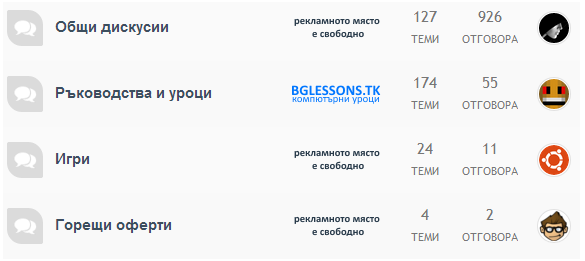
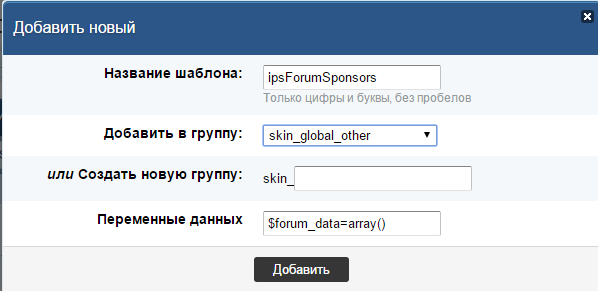
Админ Панель-Внешний вид-Ваш стиль-Глобальные-boardIndexTemplate найти: <td <if test="canSeeLastInfoRedirect:|:$this->memberData['gbw_view_last_info']">colspan='2'</if> class='col_c_forum'> Заменить на: <td <if test="canSeeLastInfoRedirect:|:$this->memberData['gbw_view_last_info']">colspan='3'</if> class='col_c_forum'> Админ Панель-Внешний вид-Ваш стиль-нажимаем кнопку (Добавить новый шаблон) Название шаблона: ipsForumSponsors Добавить в группу: skin_global_other Переменные данных: $forum_data=array() Вставить: <if test="in_array( $forum_data['id'], array( X, Y, Z ) )"> <!-- banner --> </if> Где X, Y, Z — это ID разделов, рядом с которыми будет отображаться их спонсор, а на месте будет располагаться код спонсорского баннера. Админ Панель-Внешний вид-Ваш стиль-css-ipb_styles.css добавить в самый низ: .ipsForumSponsor { width: 1%; } Пример код: <if test="in_array( $forum_data['id'], array( 2, 140, 152, 42, 5, 6, 7, 8, 39, 36, 37, 120, 122, 134, 135, 148, 136, 137, 138, 149, 130, 131, 132, 14, 15, 16, 84, 150, 145, 139, 32, 100, 33, 151, ) )"> <a href="http://silencebgsoftware.com/index.php?/user/1-silence/"><img src="http://support.silencebgsoftware.com/public/style_images/Royal/ads1.png" /></a> </if> <if test="in_array( $forum_data['id'], array( 31, Y, Z ) )"> <a href="http://bglessons.tk/" target="_blank"><img src="http://support.silencebgsoftware.com/public/style_images/Royal/7514468o.png" /></a> </if>
-
<script type="text/javascript">// <![CDATA[ document.write('<img border="0" src="http://status.icq.com/online.gif?icq=xxxxxxxxx&img=N&rnd='+Math.random()+'" />') // ]]></script> <noscript><img border="0" src="http://status.icq.com/online.gif?icq=xxxxxxxxx&img=N" /></noscript> Где ‘xxxxxxxxx’ – номер ICQ, ‘N’ – id типа иконки (я использую стандартную – 5). Дополнительный параметр ‘rnd=’+Math.random()’ не нужен серверу ICQ, но позволяет обмануть браузер, чтобы он не использовал изображения из кеша. Замечания .mbh-notification-box { -moz-border-radius: 3px; -webkit-border-radius: 3px; border-radius: 3px; color: #ffffff; font-family: 'Open Sans', sans-serif; margin-bottom: 25px; padding: 10px 14px 10px 44px; position: relative; width: -moz-fit-content; width: -webkit-fit-content; width: fit-content; } .mbh-notification-box:before { font-family: FontAwesome; font-size: 21px; left: 14px; position: absolute; } .mbh-warning { background-color: #e67e22; } .mbh-warning:before { content: "\f12a"; margin-left: 5px; margin-top:-5px; } Первое. Данным способом отображается только онлайн/оффлайн состояние: ‘Недоступен’, ‘Не беспокоить’ и проч. ‘нюансы’ отражаются одной и той же иконкой как и ‘В сети’. Если кто-то знает как это поправить – пишите, буду вам благодарен за подсказку/наводку. Второе. Если статус всегда отображается как ‘Не в сети’ – дело скорее всего в клиенте ICQ, копать нужно в настройках там.
-
Админ Панель-Внешний вид-Ваш стиль-Темы-post найти: <ul id='postControlsNormal_{$post['post']['pid']}' class='post_controls clear clearfix' <if test="hideNormalControlsForUnapprovedPost:|:$this->memberData['is_mod'] && ! $topic['_isArchived'] && $post['post']['queued']">style='display:none'</if>> Више вставить: <!--FMW34 - Social Bookmarks--> <if test="$post['post']['post_count'] == 1"> <script type="text/javascript">(function() { if (window.pluso)if (typeof window.pluso.start == "function") return; if (window.ifpluso==undefined) { window.ifpluso = 1; var d = document, s = d.createElement('script'), g = 'getElementsByTagName'; s.type = 'text/javascript'; s.charset='UTF-8'; s.async = true; s.src = ('https:' == window.location.protocol ? 'https' : 'http') + '://share.pluso.ru/pluso-like.js'; var h=d[g]('body')[0]; h.appendChild(s); }})();</script> <div class="pluso" data-background="transparent" data-options="medium,square,line,horizontal,counter,theme=01" data-services="vkontakte,odnoklassniki,facebook,twitter,google,moimir,email,print"></div> </if> <!--FMW34 - Social Bookmarks--> Код между тегами <if> <...> </if> можете изменить на свой. Вот некоторые сервисы соц. закладок:

-
Админ Панель-Внешний вид-Ваш стиль-Глобальные-globalTemplate найти: </body></html> Поред этим вставить: <link href="//maxcdn.bootstrapcdn.com/font-awesome/4.2.0/css/font-awesome.min.css" rel="stylesheet"> <a href="{$this->settings['board_url']}" title="Главная" style="display:scroll;position:fixed;bottom:60%;left:6px;"><i class="fa fa-home"></i></a> <a href="javascript:history.forward(0)" onmouseover="window.status='Вперед';return true" style="display:scroll;position:fixed;bottom:56%;left:8px;"><i class="fa fa-chevron-right"></i></a> <a href="javascript:history.back(0)" onmouseover="window.status='Назад';return true" style="display:scroll;position:fixed;bottom:52%;left:6px;"><i class="fa fa-chevron-left"></i></a> <!-- Botã --> <!-- Start --> <a href="#GoDown" style="display:scroll;position:fixed;bottom:44%;left:5px;" title="Вниз"><i class="fa fa-chevron-down"></i></a> <a name="GoDown" id="GoDown"> <!-- Finish --> <!-- Start --> <a href="#" rel="nofollow" style="display:scroll;position:fixed;bottom:48%;left:5px;" title="Вверх"><i class="fa fa-chevron-up"></i></a></a> <!-- Finish --> <!-- Finish có -->
-
Админ Панель-Внешний вид-Ваш стиль-css-ipb_styles.css найти: /* board stats */ #board_stats ul { text-align: center; } #board_stats li { margin-right: 20px; } #board_stats .value { display: inline-block; background: #e2e2e2; color: #4a4a4a; padding: 2px 6px; font-weight: bold; -moz-border-radius: 2px; -webkit-border-radius: 2px; border-radius: 2px; margin-right: 3px; } .statistics { margin: 20px 0 0 0; padding: 10px 0; border-top: 3px solid #d8d8d8; line-height: 1.3; overflow: hidden; } .statistics_head { font-size: 14px; font-weight: bold; } Заменить на: /* board stats */ #board_stats ul { width: 98%; margin: 0 auto; } #board_stats li { margin-right: 20px; padding: 3px; border: 1px solid rgb(230, 230, 230); border-collapse: collapse; margin: 2px; width: 100%; border-radius: 3px; line-height: 20px; } #board_stats .value { display: inline-block; background-color: #34495e; border: 1px solid rgb(226, 215, 215); color: #fff; padding: 0px 8px; font-weight: bold; -moz-border-radius: 4px; -webkit-border-radius: 4px; border-radius: 4px; margin-right: 3px; float: right; } #board_stats .value { color: #fff; font-weight: bold; } .statistics { margin: 5px 5px 0 0; padding: 10px 10px; line-height: 1.3; overflow: hidden; } .statistics_head { font-weight: bold; font-size: 14px; color: #333232; padding: 5px 10px 20px 5px; margin: -10px -10px 10px; background: url({style_images_url}/b.png) repeat-x bottom left; } .statistics { border-top: 0; } #webaskfooter { } #webaskgroups { width: 20%; float: right; padding: 2%; } #stats .extra { color: #a2a2a2; font-size: 0.9em; } #webaskonline, #webaskonlinetoday { width: 34%; float: left; padding: 2%; } .webask_box { background: #fff; margin-bottom: 10px; } statistics { line-height: 1.3; } #stat_links{ font-weight: normal; } #stat_links a{ margin: 0 5px; } Админ Панель-Внешний вид-Ваш стиль-Глобальные-boardIndexTemplate найти: <if test="showTotals:|:$this->settings['show_totals']"> <div id='board_stats'> <ul class='ipsType_small ipsList_inline'> <li class='clear'> <span class='value'>{$stats['info']['total_posts']}</span> {$this->lang->words['total_posts']} </li> <li class='clear'> <span class='value'>{$stats['info']['mem_count']}</span> {$this->lang->words['total_members']} </li> <li class='clear'> {IPSMember::makeProfileLink( $stats['info']['last_mem_name'], $stats['info']['last_mem_id'], $stats['info']['last_mem_seo'], 'value' )} {$this->lang->words['newest_member']} </li> <li class='clear' data-tooltip="{$stats['info']['most_time']}"> <span class='value'>{$stats['info']['most_online']}</span> {$this->lang->words['online_at_once']} </li> </ul> </div> </if> <div id='board_statistics' class='statistics clearfix'> <ul id='stat_links' class='ipsList_inline right ipsType_small'> <if test="statsLinks:|:1==1"> <!-- Hook point --> <li><a href="{parse url="app=forums&module=extras&section=stats&do=leaders" base="public"}" title="{$this->lang->words['sm_forum_leaders_title']}">{$this->lang->words['sm_forum_leaders']}</a></li> <li><a href="{parse url="app=forums&module=extras&section=stats" base="public"}" title="{$this->lang->words['sm_all_posters_title']}">{$this->lang->words['sm_today_posters']}</a></li> <li><a href="{parse url="app=members&module=list&max_results=20&sort_key=posts&sort_order=desc&filter=ALL" base="public" seotitle="false"}" title="{$this->lang->words['sm_overall_posters_title']}">{$this->lang->words['sm_overall_posters']}</a></li> <if test="reputationEnabled:|:$this->settings['reputation_enabled']"> <li> <a href="{parse url="app=members&module=reputation&section=most" base="public" template="most_liked" seotitle="most_liked"}" title="<if test="reputationTypeTitle:|:$this->settings['reputation_point_types'] == 'like'">{$this->lang->words['most_rep_likes']}<else />{$this->lang->words['most_rep_rep']}</if>"> <if test="reputationType:|:$this->settings['reputation_point_types'] == 'like'"> {$this->lang->words['most_rep_likes']} <else /> {$this->lang->words['most_rep_rep']} </if> </a> </li> </if> </if> </ul> <if test="showActive:|:$this->settings['show_active'] && $this->memberData['gbw_view_online_lists']"> <h4 class='statistics_head'>{parse expression="sprintf( $this->lang->words['online_right_now'], $stats['TOTAL'] )"} {$this->lang->words['active_users']}</h4> <p class='statistics_brief desc'> {parse expression="sprintf( $this->lang->words['active_users_detail'], $stats['MEMBERS'], $stats['GUESTS'], $stats['ANON'] )"} <if test="onlineListEnabled:|:$this->settings['allow_online_list']"> <a href='{parse url="app=members&module=online&sort_order=desc" base="public"}' title='{$this->lang->words['online_link']}'>({$this->lang->words['online_link']})</a></if> </p> </if> <if test="activeNames:|:count($stats['NAMES']) && $this->settings['show_active']"> <br /> <p> <span class='name'>{parse expression="implode( ",</span> <span class='name'>", $stats['NAMES'] )"}</span> </p> </if> </div> Заменить на: <div id="webaskfooter"> <div id='board_statistics' class='webask_box'> <if test="showTotals:|:$this->settings['show_totals']"> <div id="webaskonline"> <if test="showActive:|:$this->settings['show_active'] && $this->memberData['gbw_view_online_lists']"> <h4 class='statistics_head'>{parse expression="sprintf( $this->lang->words['online_right_now'], $stats['TOTAL'] )"} {$this->lang->words['active_users']}</h4> <p class='statistics_brief desc'> {parse expression="sprintf( $this->lang->words['active_users_detail'], $stats['MEMBERS'], $stats['GUESTS'], $stats['ANON'] )"} <if test="onlineListEnabled:|:$this->settings['allow_online_list']"> <a href='{parse url="app=members&module=online&sort_order=desc" base="public"}'>({$this->lang->words['online_link']})</a></if> </p> </if> <br> <p> <span class='name'>{parse expression="implode( ",</span> <span class='name'>", $stats['NAMES'] )"}</span> </p> </if> </div> <if test="activeNames:|:count($stats['NAMES']) && $this->settings['show_active']"></if> <div id="webaskgroups"> <div id='board_stats'> <h4 class='statistics_head'>{$this->lang->words['board_stats']}</h4> <ul class="ipsType_small ipsList_inline"> <li class="clear">{$this->lang->words['total_posts']} <span class="value">{$stats['info']['total_posts']}</span></li> <li class="clear">{$this->lang->words['total_members']} <span class="value">{$stats['info']['mem_count']}</span></li> <li class="clear">{$this->lang->words['newest_member']} <a hovercard-ref="member" hovercard-id="2720" data-ipb="noparse" class="url fn name value ___hover___member _hoversetup" href='{$stats['info']['last_mem_link']}' title='{$this->lang->words['view_profile']}'>{$stats['info']['last_mem_name']}</a><span itemprop="name">{parse template="user_popup" group="global" params="$stats['info']['last_mem_id'],$stats['info']['last_mem_seo']"}</span></li> <li class="clear">{$this->lang->words['online_at_once']} <span class="value">{$stats['info']['most_online']}</span></li> </ul> </div></div> </if> </div> </div> Админ Панель-Внешний вид-Ваш стиль-Список форумов-hookMembersOnlineToday заменить все на ета: <div id="webaskonlinetoday"><script type='text/javascript'> function toggleMOT(elem) { Effect.toggle('mot_body', 'blind',{duration:.5, afterFinish: function(motb){ var hookLangCollapse = '{$this->lang->words['hookLangCollapse']}', hookLangExpand = '{$this->lang->words['hookLangExpand']}', vis = motb.element.visible(); if(vis) { elem.update(hookLangCollapse); ipb.Cookie.set( 'membersOnlineToday', 0, 1 ); }else{ elem.update(hookLangExpand); ipb.Cookie.set( 'membersOnlineToday', 1, 1 ); } }.bind(elem)}); } </script> <h4 class='statistics_head'> {$this->lang->words['hookLangOnlineToday']} {$count} <if test="$this->settings['expcol_mot']"> [<a href='#' onClick="toggleMOT(this); return false;"><if test="$state == 'collapsed'">{$this->lang->words['hookLangExpand']}<else />{$this->lang->words['hookLangCollapse']}</if></a>] </if> </h4> <p id="mot_body"<if test="$this->settings['expcol_mot'] && $state == 'collapsed'"> class='collapsedMOT' style='display: none;'</if>> <if test="$this->settings['mot_show_most_online']">{$this->lang->words['hookLangOnlineMostEver']}<br /><br /></if> <if test="count($mems)"> {$this->lang->words['hookLangOnlineList']}<br /> <span class='name'>{parse expression="implode( ",</span>\n<span class='name'>", $mems )"}</span> <else /> {$this->lang->words['hookLangOnlineTodayNone']} </if> </p></div>

-
Админ Панель-Пользователи-Управление группами пользователей вибраем себе группу на какую ви хотите поставить: Изменить: <b><img src="ссылку на вашу картинку.png" /> <span style='color:#ff0000;'></span></b>Картинки: Картинки.zip
-
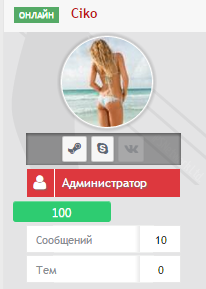
Админ Панель-Внешний вид-Ваш стиль-Глобальные-userInfoPane найти: <if test="rankimage:|:$author['member_rank_img']"> <li class='group_icon'> <if test="rankimageimage:|:$author['member_rank_img_i'] == 'img'"> <img src='{$author['member_rank_img']}' alt='' /> <else /> {$author['member_rank_img']} </if> </li> </if> Вставить после: <!-- REPUTATION--> <if test="cardRep:|:$this->settings['reputation_enabled'] && $this->settings['reputation_show_profile']"> <div class="reputation-bg" data-tooltip="{parse expression="$author['author_reputation']['text']"}"> <div class="reputation-bar <!-- GREY BAR --> <if test="$author['pp_reputation_points']==0">gray width10</if> <!-- /GREY BAR --> <!-- RED BARS --> <if test="$author['pp_reputation_points']<0 && $author['pp_reputation_points']>=-15">red</if> <if test="$author['pp_reputation_points']<-15 && $author['pp_reputation_points']>=-30">red</if> <if test="$author['pp_reputation_points']<-30 && $author['pp_reputation_points']>=-45">red</if> <if test="$author['pp_reputation_points']<-45 && $author['pp_reputation_points']>=-60">red</if> <if test="$author['pp_reputation_points']<-60">red</if> <!-- /RED BAR --> <!-- BLUE BARS --> <if test="$author['pp_reputation_points']>=1 && $author['pp_reputation_points']<=10">blue width20</if> <if test="$author['pp_reputation_points']>10 && $author['pp_reputation_points']<=20">blue width20</if> <if test="$author['pp_reputation_points']>20 && $author['pp_reputation_points']<=40">blue width30</if> <if test="$author['pp_reputation_points']>30 && $author['pp_reputation_points']<=80">blue width30</if> <if test="$author['pp_reputation_points']>40 && $author['pp_reputation_points']<=160">blue width40</if> <!-- /BLUE BARS --> <!-- GREEN BARS --> <if test="$author['pp_reputation_points']>50 && $author['pp_reputation_points']<=200">green width40</if> <if test="$author['pp_reputation_points']>70 && $author['pp_reputation_points']<=250">green width50</if> <if test="$author['pp_reputation_points']>90 && $author['pp_reputation_points']<=300">green width50</if> <if test="$author['pp_reputation_points']>110 && $author['pp_reputation_points']<=350">green width60</if> <if test="$author['pp_reputation_points']>130 && $author['pp_reputation_points']<=450">green</if> <!-- /GREEN BARS --> <!-- GOLD BARS --> <if test="$author['pp_reputation_points']>150 && $author['pp_reputation_points']<=500">gold width60</if> <if test="$author['pp_reputation_points']>190 && $author['pp_reputation_points']<=550">gold width70</if> <if test="$author['pp_reputation_points']>230 && $author['pp_reputation_points']<=600">gold width80</if> <if test="$author['pp_reputation_points']>270 && $author['pp_reputation_points']<=700">gold width90</if> <if test="$author['pp_reputation_points']>800">gold</if> <!-- /GOLD BARS --> "> {$author['pp_reputation_points']} </div> </div> </if> <!-- /REPUTATION--> Админ Панель-Внешний вид-Ваш стиль-css-ipb_styles.css добавить у самый низ: /** * Reputation Bar */ .reputation-bg { background: #415C71; border: 1px solid #415C71; border-radius: 4px; -moz-border-radius: 4px; -webkit-border-radius: 4px } .reputation-bar { border-radius: 4px; -moz-border-radius: 4px; -webkit-border-radius: 4px; font: 12px/23px "Segoe UI",Arial,Tahoma,sans-serif; color: #fff; height: 21px; margin: 1px; text-align: center; } .reputation-bar.gray { background:#BDC3C7; } .reputation-bar.red { background:#C0392B; } .reputation-bar.blue { background:#3498DB; } .reputation-bar.green { background:#2ECC71; } .reputation-bar.gold { background:#F1C40F; } .reputation-bar.width10 { width: 10% } .reputation-bar.width20 { width: 20% } .reputation-bar.width30 { width: 30% } .reputation-bar.width40 { width: 40% } .reputation-bar.width50 { width: 50% } .reputation-bar.width60 { width: 60% } .reputation-bar.width70 { width: 70% } .reputation-bar.width80 { width: 80% } .reputation-bar.width90 { width: 90% }
-
Админ Панель-Внешний вид-Ваш стиль-Глобальные-globalTemplate найти: <body id='ipboard_body'> После вставить: <a href="javascript:history.back(0)" onmouseover="window.status='Назад';return true" class="ctrleft"></a> <a class="bgbacktotop" href="#top" onclick="jQuery('html, body').animate({scrollTop:0}, 'slow');return false;" ></a> <a class="bgbacktobot" href="#bottom" onclick="jQuery('html, body').animate({scrollTop:document.documentElement.scrollHeight}, 'slow');return false;" ></a> Админ Панель-Внешний вид-Ваш стиль-css-ipb_styles.css вставить у самый низ: .ctrleft { background: url({style_images_url}/backk.png")no-repeat center; width: 50px; height: 100%; z-index: 0; position: fixed; top: 0; opacity: 0.4; -webkit-transition: all .7s ease-in-out; -moz-transition: all .7s ease-in-out; -o-transition: all .7s ease-in-out; -ms-transition: all .7s ease-in-out; transition: all .7s ease-in-out; } .ctrleft:hover, .ctrright:hover { opacity: 1.0; } a.bgbacktotop { position: fixed; top:45%; opacity: 0.4; right: 2px; width: 48px; height: 48px; display: block; background: url({style_images_url}/go_top.png) no-repeat 0px 0px; z-index: 99999999; -webkit-transition: all .7s ease-in-out; -moz-transition: all .7s ease-in-out; -o-transition: all .7s ease-in-out; -ms-transition: all .7s ease-in-out; transition: all .7s ease-in-out; } a.bgbacktotop:hover { opacity:1; } a.bgbacktobot { position: fixed; top:55%; opacity: 0.4; right: 2px; width: 48px; height: 48px; display: block; background: url({style_images_url}/go_bottom.png) no-repeat scroll 0px 0px transparent; z-index: 99999999; -webkit-transition: all .7s ease-in-out; -moz-transition: all .7s ease-in-out; -o-transition: all .7s ease-in-out; -ms-transition: all .7s ease-in-out; transition: all .7s ease-in-out; } a.bgbacktobot:hover { opacity:1; } Загрузить картинки на фтп у ваш стиль: Картинки.zip

-
И так приступим. Заходим: ац -> внешний вид -> ваш стиль -> css -> создаем новый css с таким названием: с таким содержимым: .wa_userinfo_bg{ height: 50px; background: #fff !important; background-size: 100% 100% !important; border-radius: 2px 2px 0 0; } С CSS закончили. Перейдем к файлам Шаблона открываем: шаблоный -> Профили пользователей -> customizeProfile заменяем все содержимое на это: <style type="text/css"> <if test="hasBodyCustomization:|:$member['customization']['bg_color'] OR $member['customization']['_bgUrl']"> #customBackground{ <if test="hasBackgroundColor:|:$member['customization']['bg_color']"> background-color: #{$member['customization']['bg_color']} !important; </if> <if test="hasBackgroundImage:|:$member['customization']['_bgUrl']"> background-image: url("{$member['customization']['_bgUrl']}?nc={$member['pp_profile_update']}") !important; <if test="backgroundIsFixed:|:! $member['customization']['bg_tile']"> background-position: 50% 50%; background-repeat: no-repeat; -webkit-background-size: 100% 100%; -moz-background-size: 100% 100%; background-size: cover; <else /> background-position: 50% 50%; background-repeat: repeat; </if> </if> height: 500px; margin: -9px -9px 0 -9px; } #profile_background > .ipsLayout{ position: relative; margin-top: -129px; } #user_info_cell, #user_info_cell *{ color: #fff; text-shadow: rgba(0,0,0,0.9) 0px 1px 8px; } .ipsLayout.ipsLayout_withleft{padding-left: 150px;background: none !important;} #user_utility_links{ margin-top: 0; } #user_utility_links a{ background: url("{style_images_url}/trans50.png") repeat; background: rgba(0,0,0,0.5); -webkit-box-shadow: inset rgba(0,0,0,0.4) 0px 1px 3px, rgba(255,255,255,0.1) 0px 1px 0px; -moz-box-shadow: inset rgba(0,0,0,0.4) 0px 1px 3px, rgba(255,255,255,0.1) 0px 1px 0px; box-shadow: inset rgba(0,0,0,0.4) 0px 1px 3px, rgba(255,255,255,0.1) 0px 1px 0px; color: #fff; display: inline-block; padding: 0 10px; border-radius: 3px; line-height: 30px; height: 30px; text-shadow: rgba(0,0,0,0.4) 0px 1px 0px; border: 0; } #user_utility_links a:hover{ background: url("{style_images_url}/trans70.png") repeat; background: rgba(0,0,0,0.7); } #user_utility_links img{ margin-right: 4px; } </if> </style> <script type="text/javascript"> ipb.profile.customization = 1; </script> С customizeProfile закончили. Открываем profileModern И после: <div class='ipsBox vcard' id='profile_background'> вставляем: <div id="customBackground"></div> с видом профиля закончили. Теперь будем делать userInfoPane: Открываем userInfoPane и сразу после: <span class='hide' itemprop="name">{$author['members_display_name']}</span> Вставляем: <div class='wa_showcard' style='<if test="hasBodyCustomization:|:$author['customization']['bg_color'] OR $author['customization']['_bgUrl']"> <if test="hasBackgroundColor:|:$author['customization']['bg_color']"> background-color: #{$author['customization']['bg_color']} !important; </if> <if test="hasBackgroundImage:|:$author['customization']['_bgUrl']"> background-image: url("{$author['customization']['_bgUrl']}?nc={$author['pp_profile_update']}") !important; <if test="backgroundIsFixed:|:! $author['customization']['bg_tile']"> background-color: #FFFFFF !important; background-position: 50% 50%; background-repeat: no-repeat; -webkit-background-size: 100% 100%; -moz-background-size: 100% 100%; background-size: 100% 100% !important; height: 110px; margin: -9px -9px 0 -9px; <else /> background-position: 0px 0px; background-attachment: fixed; background-repeat: repeat; </if> </if> </if> ' ></div> Делаем персонализацию во всплывающем окне. открываем: showCard и все заменяем на: <div class='vcard userpopup'> <h3 class="wa_showcard" style=' <if test="hasBackgroundColor:|:$member['customization']['bg_color']"> background-color: #{$member['customization']['bg_color']} !important; </if> <if test="hasBackgroundImage:|:$member['customization']['_bgUrl']"> background-image: url("{$member['customization']['_bgUrl']}?nc={$member['pp_profile_update']}") !important; height: 100px !important; line-height: 190px; background-repeat: no-repeat; -webkit-background-size: 100% 100% !important; -moz-background-size: 100% 100% !important; background-size: 100% 100% !important; background-position: 50% 50%; </if> </if> background-image: url({$member['customization']['_bgUrl']}) !important;'> <a href="{parse url="showuser={$member['member_id']}" seotitle="{$member['members_seo_name']}" template="showuser" base="public"}" class="fn nickname url">{$member['members_display_name']}</a></h3> <div class='side left ipsPad'> <a href="{parse url="showuser={$member['member_id']}" seotitle="{$member['members_seo_name']}" template="showuser" base="public"}" class="ipsUserPhotoLink"> <img src="{$member['pp_thumb_photo']}" alt="{$this->lang->words['get_photo']}" class='ipsUserPhoto ipsUserPhoto_large' /> </a> <br /> <if test="cardRep:|:$this->settings['reputation_enabled'] && $this->settings['reputation_show_profile']"> <if test="cardRepPos:|:$member['pp_reputation_points'] > 0"> <div class='reputation positive'> </if> <if test="cardRepNeg:|:$member['pp_reputation_points'] < 0"> <div class='reputation negative'> </if> <if test="cardRepZero:|:$member['pp_reputation_points'] == 0"> <div class='reputation zero'> </if> <span class='number'>{$member['pp_reputation_points']}</span> </div> </if> <a href='{parse url="app=core&module=search&do=user_activity&mid={$member['member_id']}" base="public"}' title='{$this->lang->words['gbl_find_my_content']}' class='ipsButton_secondary ipsType_smaller'>{$this->lang->words['gbl_find_my_content']}</a> <if test="cardSendPm:|:$this->memberData['member_id'] AND $this->memberData['member_id'] != $member['member_id'] AND $this->memberData['g_use_pm'] AND $this->memberData['members_disable_pm'] == 0 AND IPSLib::moduleIsEnabled( 'messaging', 'members' ) AND $member['members_disable_pm'] == 0"> <a href='{parse url="app=members&module=messaging&section=send&do=form&fromMemberID={$member['member_id']}" base="public"}' title='{$this->lang->words['pm_this_member']}' id='pm_xxx_{$member['member_id']}' class='pm_button ipsButton_secondary ipsType_smaller'>{$this->lang->words['pm_this_member']}</a> </if> </div> <div class='ipsPad'> <if test="cardStatus:|:$member['_status']['status_content']"> <p class='message user_status'>{$member['_status']['status_content']}</p> </if> <div class='info'> <dl> <dt>{$this->lang->words['m_group']}</dt> <dd>{$member['_group_formatted']}</dd> <dt>{$this->lang->words['m_posts']}</dt> <dd>{parse format_number="$member['posts']"}</dd> <dt>{$this->lang->words['m_member_since']}</dt> <dd>{parse date="$member['joined']" format="joined"}</dd> <dt>{$this->lang->words['m_last_active']}</dt> <dd><if test="cardOnline:|:$member['_online']"><span class='ipsBadge ipsBadge_green'>{$this->lang->words['online_online']}</span><else /><span class='ipsBadge ipsBadge_grey'>{$this->lang->words['online_offline']}</span></if> {$member['_last_active']}</dd> <if test="cardWhere:|:$member['_online'] && ($member['online_extra'] != $this->lang->words['not_online'])"> <dt>{$this->lang->words['m_currently']}</dt> <dd> {$member['online_extra']} </dd> </if> <if test="isadmin:|:$this->memberData['g_access_cp'] == 1"> <dt>{$this->lang->words['m_email']}</dt> <dd><a href='mailto:{$member['email']}'>{$member['email']}</a></dd> </if> </dl> </div> <ul class='user_controls clear'> <if test="authorspammer:|:$member['spamStatus'] !== NULL && $member['member_id'] != $this->memberData['member_id']"> <if test="authorspammerinner:|:$member['spamStatus'] === TRUE"> <li><a href='#' title='{$this->lang->words['spm_on']}' onclick="return ipb.global.toggleFlagSpammer({$member['member_id']}, false)">{parse replacement="spammer_on"}</a></li> <else /> <li><a title='{$this->lang->words['spm_off']}' href='{$this->settings['base_url']}app=core&module=modcp&do=setAsSpammer&member_id={$member['member_id']}&auth_key={$this->member->form_hash}' onclick="return ipb.global.toggleFlagSpammer({$member['member_id']}, true)">{parse replacement="spammer_off"}</a></li> </if> </if> <if test="cardFriend:|:$this->memberData['member_id'] AND $this->memberData['member_id'] != $member['member_id'] && $this->settings['friends_enabled'] AND $this->memberData['g_can_add_friends']"> <if test="cardIsFriend:|:IPSMember::checkFriendStatus( $member['member_id'] )"> <li><a href='{parse url="app=members&module=profile&section=friends&do=remove&member_id={$member['member_id']}&secure_key={$this->member->form_hash}" base="public"}' title='{$this->lang->words['remove_friend']}'>{parse replacement="remove_friend"}</a></li> <else /> <li><a href='{parse url="app=members&module=profile&section=friends&do=add&member_id={$member['member_id']}&secure_key={$this->member->form_hash}" base="public"}' title='{$this->lang->words['add_friend']}'>{parse replacement="add_friend"}</a></li> </if> </if> <if test="cardBlog:|:$member['has_blog'] AND IPSLib::appIsInstalled( 'blog' )"> <li><a href='{parse url="app=blog&module=display&section=blog&show_members_blogs={$member['member_id']}" base="public"}' title='{$this->lang->words['view_blog']}'>{parse replacement="blog_link"}</a></li> </if> <if test="cardGallery:|:$member['has_gallery'] AND IPSLib::appIsInstalled( 'gallery' )"> <li><a href='{parse url="app=gallery&user={$member['member_id']}" seotitle="{$member['members_seo_name']}" template="useralbum" base="public"}' title='{$this->lang->words['view_gallery']}'>{parse replacement="gallery_link"}</a></li> </if> </ul> </div> </div>


-
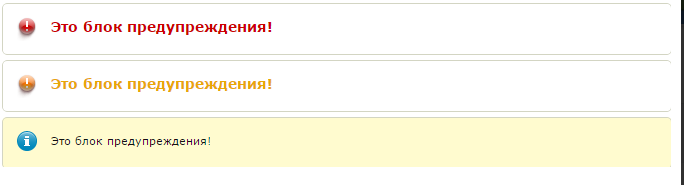
Админ Панель-Внешний вид-Ваш стиль-css-ipb_styles.css добавить у самый низ: <style type="text/css"> DIV.warn_red { background:transparent url(/pic/icon/warn_red.gif) no-repeat scroll 14px 13px; padding:2px 0 0 27px; color:#CC0000; font-size:14px; font-weight:bold; padding-bottom:7px; border:1px solid #D3D5C3; border-radius:5px 5px 5px 5px; margin-bottom:5px; padding:14px 20px 6px 48px; min-height:30px; max-width:600px; } DIV.info { background:url("/pic/icon_i.png") no-repeat scroll 14px 13px #FFFBCF; border:1px solid #D3D5C3; border-radius:5px 5px 5px 5px; margin-bottom:5px; padding:14px 20px 6px 48px; min-height:30px; max-width:600px; } DIV.warn_yellow { border:1px solid #D3D5C3; border-radius:5px 5px 5px 5px; margin-bottom:5px; padding:14px 20px 6px 48px; min-height:30px; max-width:600px; color:#E9A708; font-size:14px; font-weight:bold; background:transparent url(/pic/icon/warn_yellow.gif) no-repeat scroll 14px 13px; } </style> Админ Панель-Внешний вид-Ваш стиль добавить код куда вам будет удобно: <h1>Информационные блоки предупреждений</h1> <div class="warn_red">Это блок предупреждения!</div> <div class="warn_yellow">Это блок предупреждения!</div> <div class="info">Это блок предупреждения!</div>
-
Меню на чистом CSS3 без javascript Админ Панель-Внешний вид-Ваш стиль-css-ipb_styles.css добавить у самий ныз: <style> .container { /*margin-left: auto; margin-right: auto; margin-top: 30px;*/ width: 800px } #nav span { display: none } #nav, #nav ul { list-style: none outside none; margin: 0; padding: 0 } #nav { background-color: #f5f5f5; border-bottom: 5px solid #333; float: left; margin-left: 1%; margin-right: 1%; position: relative; width: 98% } #nav ul.subs { background-color: #fff; box-shadow: 1px 1px 5px rgba(0, 0, 0, .2); color: #333; display: none; left: 0; padding: 2%; position: absolute; top: 54px; width: 96% } #nav > li { list-style: none; padding: 0; min-width: 10px; border-bottom: 5px solid transparent; float: left; margin-bottom: -5px; text-align: left; -moz-transition: all 300ms ease-in-out 0s; -ms-transition: all 300ms ease-in-out 0s; -o-transition: all 300ms ease-in-out 0s; -webkit-transition: all 300ms ease-in-out 0s; transition: all 300ms ease-in-out 0s } #nav li a { display: block; text-decoration: none; -moz-transition: color 450ms ease-in-out 0s, background-color 450ms ease-in-out 0s; -ms-transition: color 450ms ease-in-out 0s, background-color 450ms ease-in-out 0s; -o-transition: color 450ms ease-in-out 0s, background-color 450ms ease-in-out 0s; -webkit-transition: color 450ms ease-in-out 0s, background-color 450ms ease-in-out 0s; transition: color 450ms ease-in-out 0s, background-color 450ms ease-in-out 0s; white-space: normal } #nav > li > a { color: #333; display: block; font-size: 1.3em; line-height: 49px; padding: 0 15px; text-transform: uppercase } #nav > li:hover > a, #nav > a:hover { background-color: #f55856; color: #fff } #nav li.active > a { background-color: #333; color: #fff } #nav li:hover ul.subs { display: block } #nav ul.subs > li { display: inline-block; float: none; padding: 10px 1%; vertical-align: top; width: 33% } #nav ul.subs > li a { color: #777; line-height: 20px } #nav ul li a:hover { color: #f55856 } #nav ul.subs > li > a { font-size: 1.3em; margin-bottom: 10px; text-transform: uppercase } #nav ul.subs > li li { float: none; padding-left: 8px; -moz-transition: padding 150ms ease-out 0s; -ms-transition: padding 150ms ease-out 0s; -o-transition: padding 150ms ease-out 0s; -webkit-transition: padding 150ms ease-out 0s; transition: padding 150ms ease-out 0s } #nav ul.subs > li li:hover { padding-left: 15px } @media all and (max-width: 980px) { #nav > li { float: none; border-bottom: 0; margin-bottom: 0 } #nav ul.subs { position: relative; top: 0 } #nav li:hover ul.subs { display: none } #nav li #s1:target + ul.subs, #nav li #s2:target + ul.subs { display: block } #nav ul.subs > li { display: block; width: auto } } </style> Админ Панель-Внешиний вид-Ваш стиль код: <br class="clear"> <div class=container> <ul id=nav> <li><a href="#">Главная</a></li> <li><a href="#s1">Меню 1</a> <span id=s1></span> <ul class=subs> <li><a href="#">Заголовок a</a> <ul> <li><a href="#">Подменю x</a></li> <li><a href="#">Подменю y</a></li> <li><a href="#">Подменю z</a></li> </ul> </li> <li><a href="#">Заголовок b</a> <ul> <li><a href="#">Подменю x</a></li> <li><a href="#">Подменю y</a></li> <li><a href="#">Подменю z</a></li> </ul> </li> </ul> </li> <li class=active><a href="#s2">Меню 2</a> <span id=s2></span> <ul class=subs> <li><a href="#">Заголовок c</a> <ul> <li><a href="#">Подменю x</a></li> <li><a href="#">Подменю y</a></li> <li><a href="#">Подменю z</a></li> </ul> </li> <li><a href="#">Заголовок d</a> <ul> <li><a href="#">Подменю x</a></li> <li><a href="#">Подменю y</a></li> <li><a href="#">Подменю z</a></li> </ul> </li> </ul> </li> <li><a href="#">Меню 3</a></li> </ul> </div> <br class="clear">

-
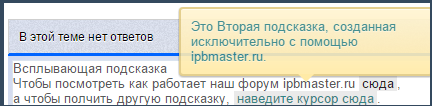
Админ Панель-Внешний вид-Ваш стиль-css-ipb_styles.css добавить у самий ныз: <style type="text/css"> h3 { margin-top: 50px; } .tooltip { position: relative; background: #eaeaea; cursor: help; display: inline-block; text-decoration: none; color: #222; outline: none; text-indent: 0; padding: 0 3px; } .tooltip:hover:before { content: attr(data-title); white-space: pre-line; position: absolute; bottom: 30px; left: 50%; z-index: 9999; width: 230px; ; padding: 10px; border: 2px solid #ccc; opacity: .9; background-color: #ddd; background-image: -webkit-linear-gradient(rgba(255,255,255,.5), rgba(255,255,255,0)); background-image: -moz-linear-gradient(rgba(255,255,255,.5), rgba(255,255,255,0)); background-image: -ms-linear-gradient(rgba(255,255,255,.5), rgba(255,255,255,0)); background-image: -o-linear-gradient(rgba(255,255,255,.5), rgba(255,255,255,0)); background-image: linear-gradient(rgba(255,255,255,.5), rgba(255,255,255,0)); -moz-border-radius: 4px; border-radius: 4px; -moz-box-shadow: 0 1px 2px rgba(0,0,0,.4), 0 1px 0 rgba(255,255,255,.5) inset; -webkit-box-shadow: 0 1px 2px rgba(0,0,0,.4), 0 1px 0 rgba(255,255,255,.5) inset; box-shadow: 0 1px 2px rgba(0,0,0,.4), 0 1px 0 rgba(255,255,255,.5) inset; text-shadow: 0 1px 0 rgba(255,255,255,.4); } .tooltip:hover:after { content: ""; position: absolute; z-index: 10000; bottom: 24px; left: 50%; ; border-top: 8px solid #ddd; border-left: 8px solid transparent; border-right: 8px solid transparent; border-bottom: 0; } /* Yellow */ .yellow-tooltip:hover:before { border-color: #e1ca82; background-color: #ffeaa6; } .yellow-tooltip:hover:after { border-top-color: #ffeaa6; } </style> Админ Панель-Внешний вид-Ваш стиль добавить код куда вам удобно: <h1>Всплывающая подсказка</h1> <p>Чтобы посмотреть как работает наш форум ipbmaster.ru <a href="#" class="tooltip yellow-tooltip" data-title="Это первая подсказка.">сюда</a>,<br> а чтобы полчить другую подсказку, <a href="#" class="tooltip yellow-tooltip" data-title="Это Вторая подсказка, созданная исключительно с помощью ipbmaster.ru.">наведите курсор сюда</a>. </p>
-
Админ Панель-Внешний вид-Ваш стиль-css-ipb_styles.css добавить у самий ныз: <style type="text/css"> .panels { display: block; width: 300px; margin: 100px auto; padding: 0; } .panels li { display: block; list-style: none; margin-bottom: 10px; } .panels li span { display: block; font-size: 0; line-height: 0; } .panels li span, .panels li div { background: #74c44c; } .panels li div { padding: 10px; color: #fff; font: 14px/18px Verdana, Arial, Helvetica, sans-serif; text-align: center; } .sp1 { height: 1px; margin: 0 5px; } .sp2 { height: 1px; margin: 0 3px; } .sp3 { height: 1px; margin: 0 2px; } .sp4 { height: 2px; margin: 0 1px; } </style><style type="text/css">.panels {display: block;width: 300px;margin: 100px auto;padding: 0;}.panels li {display: block;list-style: none;margin-bottom: 10px;}.panels li span {display: block;font-size: 0;line-height: 0;}.panels li span, .panels li div {background: #74c44c;}.panels li div {padding: 10px;color: #fff;font: 14px/18px Verdana, Arial, Helvetica, sans-serif;text-align: center;}.sp1 {height: 1px;margin: 0 5px;}.sp2 {height: 1px;margin: 0 3px;}.sp3 {height: 1px;margin: 0 2px;}.sp4 {height: 2px;margin: 0 1px;}</style> Админ Панель-Внешний вид-Ваш стиль добавит код куда вам будет удобно: <ul class="panels"> <li> <span class="ipb-board.com">http://ipb-board.com/</span> <span class="ipb-board.com"></span> <span class="ipb-board.com"></span> <span class="sp4"></span> <div>ipb-board.com</div> <span class="sp4"></span> <span class="sp3"></span> <span class="sp2"></span> <span class="sp1"></span> </li> <li> <span class="ipb-board.com"></span> <span class="ipb-board.com"></span> <span class="ipb-board.com"></span> <span class="sp4"></span> <div>ipb-board.com</div> <span class="sp4"></span> <span class="sp3"></span> <span class="sp2"></span> <span class="sp1"></span> </li> <li> <span class="ipb-board.com"></span> <span class="ipb-board.com"></span> <span class="ipb-board.com"></span> <span class="sp4"></span> <div>ipb-board.com</div> <span class="sp4"></span> <span class="sp3"></span> <span class="sp2"></span> <span class="sp1"></span> </li> </ul>

-
1. Идем в АдминЦентр - Внешний вид - Внешний вид - редактировать шаблоны : Группа шаблонов: skin_shoutbox Шаблон : shout_row Найти {$d['photo']}Заменить на: <a onclick="insertNick('{$d['members_display_name']}');" data-tooltip="Нажмите сюда , чтобы вставить ник пользователя в форму ответа чата" class="insert_nick">{$d['photo']}</a>Группа шаблонов: skin_shoutbox_hooks Шаблон : hookGlobalShoutbox Найти: ipb.shoutbox.shoutboxGLOBAL = true;Заменить на: ipb.shoutbox.shoutboxGLOBAL = true;function insertNick(nick) {document.getElementById('shoutbox-global-shout').value += '[member='+nick+'], ';}
-
Перейти Админ Панель-Внешний вид-Ваш стиль-Глобальные-globalTemplate найти: </head>Под ним вставить: <script type="text/javascript">jQuery(document).ready(function() {// Виджет кнопки вверх (Test-Templates)// Версия 1.0jQuery('body').append('<div class="button-up" style="display: none;opacity: 0.7;width: 80px;height:100%;position: fixed;left: 0px;top: 0px;cursor: pointer;text-align: center;line-height: 30px;color: #d3dbe4;font-weight: bold;">▲ Вверх</div>');jQuery (window).scroll (function () {if (jQuery (this).scrollTop () > 100) {jQuery ('.button-up').fadeIn();} else {jQuery ('.button-up').fadeOut();}});jQuery('.button-up').click(function(){jQuery('body,html').animate({scrollTop: 0}, 800);return false;});jQuery('.button-up').hover(function() {jQuery(this).animate({'opacity':'1',}).css({'background-color':'#E1E7ED','color':'#45688E'});}, function(){jQuery(this).animate({'opacity':'0.7'}).css({'background':'none','color':'#d3dbe4'});;});});</script>
-
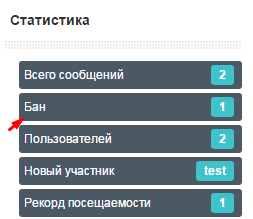
Перейти Админ Панель-Внешний вид-Ваш стиль-Список форумов-boardIndexTemplate найти: <if test="showTotals:|:$this->settings['show_totals']"> <div id='board_stats'> <ul class='ipsType_small ipsList_inline'> <li class='clear'> <span class='value'>{$stats['info']['total_posts']}</span> {$this->lang->words['total_posts']} </li><if test="showTotals:|:$this->settings['show_totals']"> <div id='board_stats'> <ul class='ipsType_small ipsList_inline'> <li class='clear'> <span class='value'>{$stats['info']['total_posts']}</span> {$this->lang->words['total_posts']} </li> После вставить: <php>$banned = ipsRegistry::DB()->buildAndFetch( array( 'select' => 'count(*) as bannedct', 'from' => 'members', 'where' => "member_group_id=5" ) ); </php> <if test="$banned[bannedct]> 0"> <li class='clear'> <span class='value'>{$banned[bannedct]}</span> Бан </li> </if>
-
Админ Панель-Внешний вид-Ваш стиль-css-ipb_styles.css найти: /* board stats */ #board_stats ul { text-align: center; } #board_stats li { margin-right: 20px; } #board_stats .value { display: inline-block; background: #e2e2e2; color: #4a4a4a; padding: 2px 6px; font-weight: bold; -moz-border-radius: 2px; -webkit-border-radius: 2px; border-radius: 2px; margin-right: 3px; } .statistics { margin: 20px 0 0 0; padding: 10px 0; border-top: 3px solid #d8d8d8; line-height: 1.3; overflow: hidden; } .statistics_head { font-size: 14px; font-weight: bold; } Заменить на: #board_stats ul{ text-align:center } #board_stats li{ margin-right:20px } #board_stats .value{ display:inline-block; background:url('{style_images_url}/trans10.png') repeat; background:rgba(0,0,0,0.1); color:#000; text-shadow:rgba(255,255,255,0.6) 0px 1px 0px; padding:3px 7px; font-weight:bold; -moz-border-radius:3px; -webkit-border-radius:3px; border-radius:3px; margin-right:3px; -webkit-box-shadow:inset rgba(0,0,0,0.3) 0px 1px 2px, rgba(255,255,255,1) 0px 1px 0px; -moz-box-shadow:inset rgba(0,0,0,0.3) 0px 1px 2px, rgba(255,255,255,1) 0px 1px 0px; box-shadow:inset rgba(0,0,0,0.3) 0px 1px 2px, rgba(255,255,255,1) 0px 1px 0px } .statistics{ margin:20px 0 0 0; padding:8px; line-height:1.3; overflow:hidden; border:1px solid #bdbdbd } .statistics_head{ border-bottom:1px solid #d8d8d8; border-top:1px solid #d8d8d8; text-shadow:rgba(255,255,255,0.8) 0px 1px 0px; background:#eee url('{style_images_url}/highlight.png') repeat-x 0 0; color: #fff; font-size:11px; font-weight:bold; padding:8px; margin: -8px -8px 8px -8px } .statistics_head, .statistics_head a{ color:#727272 } .statistics .statistics_head:first-of-type{ border-top:0 } .statistics .statistics_head:not(:first-of-type){ margin-top:0 } #stat_links{ font-weight:normal } #stat_links a{ margin:0 5px } Админ Панель-Внешний вид-Ваш стиль-Глобальные-boardIndexTemplate найти: <if test="showTotals:|:$this->settings['show_totals']"> <div id='board_stats'> <ul class='ipsType_small ipsList_inline'> <li class='clear'> <span class='value'>{$stats['info']['total_posts']}</span> {$this->lang->words['total_posts']} </li> <li class='clear'> <span class='value'>{$stats['info']['mem_count']}</span> {$this->lang->words['total_members']} </li> <li class='clear'> {IPSMember::makeProfileLink( $stats['info']['last_mem_name'], $stats['info']['last_mem_id'], $stats['info']['last_mem_seo'], 'value' )} {$this->lang->words['newest_member']} </li> <li class='clear' data-tooltip="{$stats['info']['most_time']}"> <span class='value'>{$stats['info']['most_online']}</span> {$this->lang->words['online_at_once']} </li> </ul> </div> </if> <div id='board_statistics' class='statistics clearfix'> <ul id='stat_links' class='ipsList_inline right ipsType_small'> <if test="statsLinks:|:1==1"> <!-- Hook point --> <li><a href="{parse url="app=forums&module=extras&section=stats&do=leaders" base="public"}" title="{$this->lang->words['sm_forum_leaders_title']}">{$this->lang->words['sm_forum_leaders']}</a></li> <li><a href="{parse url="app=forums&module=extras&section=stats" base="public"}" title="{$this->lang->words['sm_all_posters_title']}">{$this->lang->words['sm_today_posters']}</a></li> <li><a href="{parse url="app=members&module=list&max_results=20&sort_key=posts&sort_order=desc&filter=ALL" base="public" seotitle="false"}" title="{$this->lang->words['sm_overall_posters_title']}">{$this->lang->words['sm_overall_posters']}</a></li> <if test="reputationEnabled:|:$this->settings['reputation_enabled']"> <li> <a href="{parse url="app=members&module=reputation&section=most" base="public" template="most_liked" seotitle="most_liked"}" title="<if test="reputationTypeTitle:|:$this->settings['reputation_point_types'] == 'like'">{$this->lang->words['most_rep_likes']}<else />{$this->lang->words['most_rep_rep']}</if>"> <if test="reputationType:|:$this->settings['reputation_point_types'] == 'like'"> {$this->lang->words['most_rep_likes']} <else /> {$this->lang->words['most_rep_rep']} </if> </a> </li> </if> </if> </ul> <if test="showActive:|:$this->settings['show_active'] && $this->memberData['gbw_view_online_lists']"> <h4 class='statistics_head'>{parse expression="sprintf( $this->lang->words['online_right_now'], $stats['TOTAL'] )"} {$this->lang->words['active_users']}</h4> <p class='statistics_brief desc'> {parse expression="sprintf( $this->lang->words['active_users_detail'], $stats['MEMBERS'], $stats['GUESTS'], $stats['ANON'] )"} <if test="onlineListEnabled:|:$this->settings['allow_online_list']"> <a href='{parse url="app=members&module=online&sort_order=desc" base="public"}' title='{$this->lang->words['online_link']}'>({$this->lang->words['online_link']})</a></if> </p> </if> <if test="activeNames:|:count($stats['NAMES']) && $this->settings['show_active']"> <br /> <p> <span class='name'>{parse expression="implode( ",</span> <span class='name'>", $stats['NAMES'] )"}</span> </p> </if> </div> Заменить на: <div id='board_statistics' class='statistics clearfix'> <h4 class='statistics_head clearfix'><ul id='stat_links' class='ipsList_inline right ipsType_small'> <if test="statsLinks:|:1==1"> <!-- Hook point --> </if> </if> </ul> <if test="showActive:|:$this->settings['show_active'] && $this->memberData['gbw_view_online_lists']">{parse expression="sprintf( $this->lang->words['online_right_now'], $stats['TOTAL'] )"} {$this->lang->words['active_users']}</if></h4> <if test="activeNames:|:count($stats['NAMES']) && $this->settings['show_active']"> <p> <span class='name'>{parse expression="implode( ",</span> <span class='name'>", $stats['NAMES'] )"}</span> </p> <p class='statistics_brief desc'> {parse expression="sprintf( $this->lang->words['active_users_detail'], $stats['MEMBERS'], $stats['GUESTS'], $stats['ANON'] )"} <if test="onlineListEnabled:|:$this->settings['allow_online_list']"> <a href='{parse url="app=members&module=online&sort_order=desc" base="public"}'>({$this->lang->words['online_link']})</a></if> </p> </if> </if> <br> <h4 class='statistics_head clearfix'>Статистика игрового портала: </h4> <br> <if test="showTotals:|:$this->settings['show_totals']"> <div id='board_stats'> <ul class='ipsType_small ipsList_inline'> <li class='clear'> Количество сообщений: <span class='value'>{$stats['info']['total_posts']}</span> </li> <li class='clear'> Количество игроков: <span class='value'>{$stats['info']['mem_count']}</span> </li> <li class='clear'> Новый игрок: {IPSMember::makeProfileLink( $stats['info']['last_mem_name'], $stats['info']['last_mem_id'], $stats['info']['last_mem_seo'], 'value' )} </li> <li class='clear' data-tooltip="{$stats['info']['most_time']}"> {$this->lang->words['online_at_once']}: <span class='value'>{$stats['info']['most_online']}</span> </li> </ul> </div> <br> </if> </div>
-
Как виглядить: Перейти Админ Панель-Внешний вид-Ваш стиль-Глобалыние-userInfoPane добавти код куда вам будет удобно: <!-- REPUTATION BAR --> <if test="cardRep:|:$this->settings['reputation_enabled'] && $this->settings['reputation_show_profile']"> <div class="reputation-bg" data-tooltip="Репутация: {$author['pp_reputation_points']}"> <div class="reputation-bar <!-- GREY BAR --> <if test="$author['pp_reputation_points']==0">gray</if> <!-- /GREY BAR --> <!-- RED BARS --> <if test="$author['pp_reputation_points']<0 && $author['pp_reputation_points']>=-15">red width20</if> <if test="$author['pp_reputation_points']<-15 && $author['pp_reputation_points']>=-30">red width40</if> <if test="$author['pp_reputation_points']<-30 && $author['pp_reputation_points']>=-45">red width60</if> <if test="$author['pp_reputation_points']<-45 && $author['pp_reputation_points']>=-60">red width80</if> <if test="$author['pp_reputation_points']<-60">red</if> <!-- /RED BAR --> <!-- BLUE BARS --> <if test="$author['pp_reputation_points']>=1 && $author['pp_reputation_points']<=10">blue width20</if> <if test="$author['pp_reputation_points']>10 && $author['pp_reputation_points']<=20">blue width40</if> <if test="$author['pp_reputation_points']>20 && $author['pp_reputation_points']<=30">blue width60</if> <if test="$author['pp_reputation_points']>30 && $author['pp_reputation_points']<=40">blue width80</if> <if test="$author['pp_reputation_points']>40 && $author['pp_reputation_points']<=50">blue</if> <!-- /BLUE BARS --> <!-- GREEN BARS --> <if test="$author['pp_reputation_points']>50 && $author['pp_reputation_points']<=70">green width20</if> <if test="$author['pp_reputation_points']>70 && $author['pp_reputation_points']<=90">green width40</if> <if test="$author['pp_reputation_points']>90 && $author['pp_reputation_points']<=110">green width60</if> <if test="$author['pp_reputation_points']>110 && $author['pp_reputation_points']<=130">green width80</if> <if test="$author['pp_reputation_points']>130 && $author['pp_reputation_points']<=150">green</if> <!-- /GREEN BARS --> <!-- GOLD BARS --> <if test="$author['pp_reputation_points']>150 && $author['pp_reputation_points']<=190">gold width20</if> <if test="$author['pp_reputation_points']>190 && $author['pp_reputation_points']<=230">gold width40</if> <if test="$author['pp_reputation_points']>230 && $author['pp_reputation_points']<=270">gold width60</if> <if test="$author['pp_reputation_points']>270 && $author['pp_reputation_points']<=310">gold width80</if> <if test="$author['pp_reputation_points']>310">gold</if> <!-- /GOLD BARS --> "> {$author['pp_reputation_points']} </div> </div> </if> <!-- /REPUTATION BAR --> Перейти Админ Панель-Внешний вид-Ваш стиль-css-ipb_styles.css добавить код у самый низ: /****************************************************** Reputation Bar ******************************************************/ .reputation-bg{ background:#e4e4e4; background:-moz-linear-gradient(top, #e4e4e4 0%, #f7f7f7 100%); background:-webkit-gradient(linear, left top, left bottom, color-stop(0%,#e4e4e4), color-stop(100%,#f7f7f7)); background:-webkit-linear-gradient(top, #e4e4e4 0%,#f7f7f7 100%); background:-o-linear-gradient(top, #e4e4e4 0%,#f7f7f7 100%); background:-ms-linear-gradient(top, #e4e4e4 0%,#f7f7f7 100%); background:linear-gradient(to bottom, #e4e4e4 0%,#f7f7f7 100%); filter:progid:DXImageTransform.Microsoft.gradient( startColorstr='#e4e4e4', endColorstr='#f7f7f7',GradientType=0); border:1px solid #e4e4e4; border-radius:6px; -moz-border-radius:6px; -webkit-border-radius:6px } .reputation-bar{ background:url('reputation_bar.png') repeat-x 0 0; border:1px solid; border-radius:6px; -moz-border-radius:6px; -webkit-border-radius:6px; box-shadow:inset 0 1px 0 rgba(255,255,255,0.3); -moz-box-shadow:inset 0 1px 0 rgba(255,255,255,0.3); -webkit-box-shadow:inset 0 1px 0 rgba(255,255,255,0.3); font:12px/23px Calibri,Arial,Tahoma,sans-serif; height:21px; margin:1px; text-align:center; text-shadow:0 1px 0 rgba(255,255,255,0.3) } .reputation-bar.gray{background-color:#a2a2a2;border-color:#6a6a6a;color:#6b6b6b} .reputation-bar.red{background-color:#b00000;border-color:#910000;color:#6b0000} .reputation-bar.blue{background-color:#008cd5;border-color:#006aa1;color:#00537f} .reputation-bar.green{background-color:#20a601;border-color:#188000;color:#177a00} .reputation-bar.gold{background-color:#ccb200;border-color:#b49d00;color:#958200} .reputation-bar.width20{width:20%} .reputation-bar.width40{width:40%} .reputation-bar.width60{width:60%} .reputation-bar.width80{width:80%} Чтобы добавить новый цвет : .reputation-bar.ЦВЕТ{background-color:#ЦВЕТ;border-color:#ЦВЕТ;color:#ЦВЕТ} Чтобы добавить новую шкалу репутации добавляем допо. код: <!-- ЦВЕТ BARS --> <if test="$member['pp_reputation_points']>БАЛЛЫ && $member['pp_reputation_points']<=БАЛЛЫ">ЦВЕТ width20</if> <if test="$member['pp_reputation_points']>БАЛЛЫ && $member['pp_reputation_points']<=БАЛЛЫ">ЦВЕТ width40</if> <if test="$member['pp_reputation_points']>БАЛЛЫ && $member['pp_reputation_points']<=БАЛЛЫ">ЦВЕТ width60</if> <if test="$member['pp_reputation_points']>БАЛЛЫ && $member['pp_reputation_points']<=БАЛЛЫ">ЦВЕТ width80</if> <if test="$member['pp_reputation_points']>БАЛЛЫ && $member['pp_reputation_points']<=БАЛЛЫ">ЦВЕТ</if> <!-- /ЦВЕТ BARS --> Загружаем в папку с изображениями фон reputation_bar.png post-566-0-99864800-1370620173.zip
-
Админ Панель-Внешний вид-Ваш стиль-Глобальные-globalTemplate найти: <div class="guestMessage"> ниже добавить: <div style="float: right; padding-top: 0px;"> <a href='{parse url="app=core&module=global&section=register" base="public"}'><img src="http://ссилка на ваш форум/public/style_images/registr.png" style="float: right;"> </a> </div> <h2>Форум игроков Counter Strike 1.6, Source, Global Offensive</h2> <strong>Добро пожаловать на проект (Название вашего форума) - Форум игроков Counter Strike 1.6</strong><br> Зарегистрируйте на форуме, чтобы принять участие в жизни форума и получить бонусы за регистрацию! Админ Панель-Внешний вид-Ваш стиль-css-ipb_styles.css добавить у самый низ: .guestMessage1 { background:#F64747; border:1px solid #D73838; line-height:140%; margin-bottom:16px; padding:15px 25px; color:#E4F1FE; border-left:8px solid #D73838; transition:all 0.3s linear 0s } .guestMessage1 strong { display:inline-block; margin-bottom:6px } .guestMessage1 h2 { font-size:1.9em; line-height:160%; color:#E4F1FE } .guestMessage1 a { text-decoration:none } .guestMessage1:hover { background-color:#D73838 } Загрузить картинку и заменить ссилки forum_old-48.zip
-
Админ Панель-Внешний вид-Ваш стиль-css-ipb_styles.css добавить у самый низ: .ipsUserPhoto_large { border-radius: 50%; } .ipsUserPhoto_medium { border-radius: 50%; } .ipsUserPhoto_mini { border-radius: 50%; }
-
Что бы установить, идем в АЦ >> Внешний вид >> Сообщения >> Скрытый текст (Или как у вас называется спойлер) и заменяем Шаблон замены BB-кода на: <div style="margin:10px; margin-top:5px"><div><input class="button2 btnlite" type="button"value="Показать спойлер" style="border-color:#666666;font-weight:bold;background-color:#fffffff;color:#11c0db;text-align:center;width:180px;margin:0px;font-size:1em;padding:0px;" onclick="if (this.parentNode.parentNode.getElementsByTagName('div')[1].getElementsByTagName('div')[0].style.display != '') { this.parentNode.parentNode.getElementsByTagName('div')[1].getElementsByTagName('div')[0].style.display = ''; this.innerText = ''; this.value = 'Спрятать спойлер'; } else { this.parentNode.parentNode.getElementsByTagName('div')[1].getElementsByTagName('div')[0].style.display = 'none'; this.innerText = ''; this.value = 'Показать еще раз?'; }" /></div><div ><div style="display: none;">{content}</div></div></div>
-
Админ Панель-Внешний вид-Ваш стиль-Глобальные-globalTemplate найти: <!-- ::: MAIN CONTENT AREA ::: --> <div id='content' class='clearfix'> Под ним вставить: <div class="bookmarks bookmarks-expand bookmarks-center "><ul class="socials"> <li class="facebook"><a href="https://www.facebook.com/pages/SilenceBgSoftware/141200099391671" target="_blank"> </a></li> <li class="googlebookmarks"><a href="https://plus.google.com/+Silencebgsoftware/posts" target="_blank"> </a></li> <li class="twitter"><a href="http://twitter.com/" target="_blank"> </a></li> <li class="stumbleupon"><a href="http://www.stumbleupon.com/su/790tnx/silencebgsoftware.com/" target="_blank"> </a></li> <li class="comfeed"><a href="http://silencebgsoftware.com/index.php?/rss/forums/1-silencebgsoftware/" target="_blank"> </a></li> <li class="delicious"><a href="http://delicious.com/" target="_blank"> </a></li> <li class="digg"><a href="http://digg.com/" target="_blank"> </a></li> <li class="gmail"><a href="https://mail.google.com/" target="_blank"> </a></li> <li class="hotmail"><a href="http://mail.live.com/" target="_blank"> </a></li> <li class="yahoomail"><a href="http://compose.mail.yahoo.com/" target="_blank"> </a></li> <li class="myspace"><a href="http://myspace.ge/" target="_blank"> </a></li> <li class="blinklist"><a href="http://blinklist.com/" target="_blank"> </a></li> <li class="hackernews"><a href="https://news.ycombinator.com/" target="_blank"> </a></li> <li class="designbump"><a href="http://designbump.com/" target="_blank"> </a></li> <li class="globalgrind"><a href="http://www.socialglobalgrind.com/" target="_blank"> </a></li> <li class="posterous"><a href="http://www.posterous.com/" target="_blank"> </a></li> <li class="techmeme"><a href="http://www.techmeme.com/" target="_blank"> </a></li> <li class="tumblr"><a href="https://www.tumblr.com/" target="_blank"> </a></li> </ul><div style="clear: both;"></div></div> (Заменить на ваши ссылки) Админ Панель-Внешний вид-Ваш стиль-Добавить CSS-файл Название: style. div.bookmarks { margin-top:-20px; clear: both !important; } div.bookmarks-expand { height: 32px; overflow: hidden; } div.bookmarks ul.socials { width: 100% !important; margin: 0 !important; padding: 0 !important; background: transparent none !important; border: 0 none !important; outline: 0 none !important; } div.bookmarks ul.socials li { background-image: url({style_images_url}/sprite.png ) !important; background-repeat: no-repeat !important; display: inline !important; float: left !important; list-style-type: none !important; padding: 0 !important; height: 29px !important; width: 60px !important; cursor: pointer !important; margin: 3px 0 0 !important; background-color: transparent !important; border: 0 none !important; outline: 0 none !important; clear: none !important; } div.bookmarks ul.socials li:before, div.bookmarks ul.socials li:after, div.bookmarks ul.socials li a:before, div.bookmarks ul.socials li a:after { content: '' !important; } div.bookmarks ul.socials a, div.bookmarks ul.socials a:hover { display: block !important; width: 60px !important; height: 29px !important; text-indent: -9999px !important; background-color: transparent !important; text-decoration: none !important; border: 0 none !important; margin: 0 !important; padding: 0 !important; } div.bookmarks ul.socials a:hover, div.bookmarks ul.socials li:hover { background-color: transparent !important; border: 0 none !important; outline: 0 none !important; } li.newsvine { background-position: left bottom !important; } li.newsvine:hover { background-position: left top !important; } li.linkedin { background-position: -70px bottom !important; } li.linkedin:hover { background-position: -70px top !important; } li.googlebookmarks { background-position: -140px bottom !important; } li.googlebookmarks:hover { background-position: -140px top !important; } li.googlereader { background-position: -210px bottom !important; } li.googlereader:hover { background-position: -210px top !important; } li.scriptstyle { background-position: -280px bottom !important; } li.scriptstyle:hover { background-position: -280px top !important; } li.mail { background-position: -350px bottom !important; } li.mail:hover { background-position: -350px top !important; } li.comfeed { background-position: -420px bottom !important; } li.comfeed:hover { background-position: -420px top !important; } li.twitter { background-position: -490px bottom !important; } li.twitter:hover { background-position: -490px top !important; } li.technorati { background-position: -560px bottom !important; } li.technorati:hover { background-position: -560px top !important; } li.stumbleupon { background-position: -630px bottom !important; } li.stumbleupon:hover { background-position: -630px top !important; } li.reddit { background-position: -700px bottom !important; } li.reddit:hover { background-position: -700px top !important; } li.myspace { background-position: -770px bottom !important; } li.myspace:hover { background-position: -770px top !important; } li.mixx { background-position: -840px bottom !important; } li.mixx:hover { background-position: -840px top !important; } li.diigo { background-position: -910px bottom !important; } li.diigo:hover { background-position: -910px top !important; } li.digg { background-position: -980px bottom !important; } li.digg:hover { background-position: -980px top !important; } li.designfloat { background-position: -1050px bottom !important; } li.designfloat:hover { background-position: -1050px top !important; } li.yahoobuzz { background-position: -1120px bottom !important; } li.yahoobuzz:hover { background-position: -1120px top !important; } li.delicious { background-position: -1190px bottom !important; } li.delicious:hover { background-position: -1190px top !important; } li.blinklist { background-position: -1260px bottom !important; } li.blinklist:hover { background-position: -1260px top !important; } li.facebook { background-position: -1330px bottom !important; } li.facebook:hover { background-position: -1330px top !important; } li.misterwong { background-position: -1400px bottom !important; } li.misterwong:hover { background-position: -1400px top !important; } li.izeby { background-position: -1470px bottom !important; } li.izeby:hover { background-position: -1470px top !important; } li.twittley { background-position: -1540px bottom !important; } li.twittley:hover { background-position: -1540px top !important; } li.tipd { background-position: -1610px bottom !important; } li.tipd:hover { background-position: -1610px top !important; } li.pfbuzz { background-position: -1680px bottom !important; } li.pfbuzz:hover { background-position: -1680px top !important; } li.friendfeed { background-position: -1750px bottom !important; } li.friendfeed:hover { background-position: -1750px top !important; } li.blogmarks { background-position: -1820px bottom !important; } li.blogmarks:hover { background-position: -1820px top !important; } li.fwisp { background-position: -1890px bottom !important; } li.fwisp:hover { background-position: -1890px top !important; } li.yahoomail { background-position: -1960px bottom !important; } li.yahoomail:hover { background-position: -1960px top !important; } li.bobrdobr { background-position: -2030px bottom !important; } li.bobrdobr:hover { background-position: -2030px top !important; } li.memoryru { background-position: -2100px bottom !important; } li.memoryru:hover { background-position: -2100px top !important; } li.bookmark_100zakladok { background-position: -2170px bottom !important; } li.bookmark_100zakladok:hover { background-position: -2170px top !important; } li.yandex { background-position: -2240px bottom !important; } li.yandex:hover { background-position: -2240px top !important; } li.moemesto { background-position: -2310px bottom !important; } li.moemesto:hover { background-position: -2310px top !important; } li.marrows { background-position: -2380px bottom !important; } li.marrows:hover { background-position: -2380px top !important; } li.identica { background-position: -2450px bottom !important; } li.identica:hover { background-position: -2450px top !important; } li.hackernews { background-position: -2520px bottom !important; } li.hackernews:hover { background-position: -2520px top !important; } li.ning { background-position: -2590px bottom !important; } li.ning:hover { background-position: -2590px top !important; } li.designbump { background-position: -2660px bottom !important; } li.designbump:hover { background-position: -2660px top !important; } li.printfriendly { background-position: -2730px bottom !important; } li.printfriendly:hover { background-position: -2730px top !important; } li.fleck { background-position: -2800px bottom !important; } li.fleck:hover { background-position: -2800px top !important; } li.netvibes { background-position: -2870px bottom !important; } li.netvibes:hover { background-position: -2870px top !important; } li.netvouz { background-position: -2940px bottom !important; } li.netvouz:hover { background-position: -2940px top !important; } li.nujij { background-position: -3010px bottom !important; } li.nujij:hover { background-position: -3010px top !important; } li.globalgrind { background-position: -3080px bottom !important; } li.globalgrind:hover { background-position: -3080px top !important; } li.wikio { background-position: -3150px bottom !important; } li.wikio:hover { background-position: -3150px top !important; } li.xerpi { background-position: -3220px bottom !important; } li.xerpi:hover { background-position: -3220px top !important; } li.sphinn { background-position: -3290px bottom !important; } li.sphinn:hover { background-position: -3290px top !important; } li.hotmail { background-position: -3360px bottom !important; } li.hotmail:hover { background-position: -3360px top !important; } li.posterous { background-position: -3430px bottom !important; } li.posterous:hover { background-position: -3430px top !important; } li.techmeme { background-position: -3500px bottom !important; } li.techmeme:hover { background-position: -3500px top !important; } li.ekudos { background-position: -3570px bottom !important; } li.ekudos:hover { background-position: -3570px top !important; } li.pingfm { background-position: -3640px bottom !important; } li.pingfm:hover { background-position: -3640px top !important; } li.tomuse { background-position: -3710px bottom !important; } li.tomuse:hover { background-position: -3710px top !important; } li.webblend { background-position: -3780px bottom !important; } li.webblend:hover { background-position: -3780px top !important; } li.wykop { background-position: -3850px bottom !important; } li.wykop:hover { background-position: -3850px top !important; } li.blogengage { background-position: -3920px bottom !important; } li.blogengage:hover { background-position: -3920px top !important; } li.hyves { background-position: -3990px bottom !important; } li.hyves:hover { background-position: -3990px top !important; } li.pusha { background-position: -4060px bottom !important; } li.pusha:hover { background-position: -4060px top !important; } li.hatena { background-position: -4130px bottom !important; } li.hatena:hover { background-position: -4130px top !important; } li.mylinkvault { background-position: -4200px bottom !important; } li.mylinkvault:hover { background-position: -4200px top !important; } li.slashdot { background-position: -4270px bottom !important; } li.slashdot:hover { background-position: -4270px top !important; } li.squidoo { background-position: -4340px bottom !important; } li.squidoo:hover { background-position: -4340px top !important; } li.propeller { background-position: -4410px bottom !important; } li.propeller:hover { background-position: -4410px top !important; } li.faqpal { background-position: -4480px bottom !important; } li.faqpal:hover { background-position: -4480px top !important; } li.evernote { background-position: -4550px bottom !important; } li.evernote:hover { background-position: -4550px top !important; } li.meneame { background-position: -4620px bottom !important; } li.meneame:hover { background-position: -4620px top !important; } li.bitacoras { background-position: -4690px bottom !important; } li.bitacoras:hover { background-position: -4690px top !important; } li.jumptags { background-position: -4760px bottom !important; } li.jumptags:hover { background-position: -4760px top !important; } li.bebo { background-position: -4830px bottom !important; } li.bebo:hover { background-position: -4830px top !important; } li.n4g { background-position: -4900px bottom !important; } li.n4g:hover { background-position: -4900px top !important; } li.strands { background-position: -4970px bottom !important; } li.strands:hover { background-position: -4970px top !important; } li.orkut { background-position: -5040px bottom !important; } li.orkut:hover { background-position: -5040px top !important; } li.tumblr { background-position: -5110px bottom !important; } li.tumblr:hover { background-position: -5110px top !important; } li.stumpedia { background-position: -5180px bottom !important; } li.stumpedia:hover { background-position: -5180px top !important; } li.current { background-position: -5250px bottom !important; } li.current:hover { background-position: -5250px top !important; } li.blogger { background-position: -5320px bottom !important; } li.blogger:hover { background-position: -5320px top !important; } li.plurk { background-position: -5390px bottom !important; } li.plurk:hover { background-position: -5390px top !important; } li.virb { background-position: -5460px bottom !important; } li.virb:hover { background-position: -5460px top !important; } li.dzone { background-position: -5530px bottom !important; } li.dzone:hover { background-position: -5530px top !important; } li.kaevur { background-position: -5600px bottom !important; } li.kaevur:hover { background-position: -5600px top !important; } li.box { background-position: -5670px bottom !important; } li.box:hover { background-position: -5670px top !important; } li.oknotizie { background-position: -5740px bottom !important; } li.oknotizie:hover { background-position: -5740px top !important; } li.bonzobox { background-position: -5810px bottom !important; } li.bonzobox:hover { background-position: -5810px top !important; } li.plaxo { background-position: -5880px bottom !important; } li.plaxo:hover { background-position: -5880px top !important; } li.springpad { background-position: -5950px bottom !important; } li.springpad:hover { background-position: -5950px top !important; } li.zabox { background-position: -6020px bottom !important; } li.zabox:hover { background-position: -6020px top !important; } li.viadeo { background-position: -6090px bottom !important; } li.viadeo:hover { background-position: -6090px top !important; } li.googlebuzz { background-position: -6160px bottom !important; } li.googlebuzz:hover { background-position: -6160px top !important; } li.gmail { background-position: -6230px bottom !important; } li.gmail:hover { background-position: -6230px top !important; } li.bzzster { background-position: -6300px bottom !important; } li.bzzster:hover { background-position: -6300px top !important; } Скачать иконки здесь: sprite.zip Распаковать и загрузить изображение на FTP в ваш стиль. Ваш форум --> public --> style_images --> ваш стиль